Table of contents
Ask an LLM agent a simple question and it works fine. Ask it to design a scalable e-commerce platform, plan a multi-day hiking trip, or analyze a complex codebase, and you quickly hit the limits of single-shot generation. The model produces a wall of text that is shallow, repetitive, or misses key aspects of the problem. The issue is not capability, it is structure.
WHuman experts do not tackle complex problems in one pass. They break the work into subtasks, track progress, build on earlier findings, and carry knowledge from one engagement to the next. ragbits 1.6 brings these same patterns to agentic AI: structured planning, real-time progress visibility, and persistent memory across conversations.
This release introduces three closely related capabilities that address fundamental challenges in moving agentic systems from prototype to production.
What is ragbits?
Before diving into the new features, it helps to understand the broader context of ragbits.
ragbits is an open-source Python framework that gives teams modular building blocks for GenAI applications. Instead of assembling LLM APIs, retrieval, ingestion, orchestration, and interfaces from scratch, teams can use ready-made components covering the most common parts of modern GenAI systems.
It supports key areas such as RAG pipelines, LLM orchestration, agentic workflows, and the evaluation and guardrails needed for production. Because the framework is modular, teams can adopt it incrementally and integrate it with their existing infrastructure.
The goal is to help teams move from prototype to production faster, without rebuilding the stack at every stage.
More about ragbits and case studies, you can read here.
What’s new in ragbits 1.6
Release 1.6 focuses on giving AI agents structure, visibility, and memory. Every feature below addresses a specific challenge that emerges when AI agents need to handle complex, multi-step tasks and maintain context across conversations:
- Agent planning tools for structured task decomposition and sequential execution
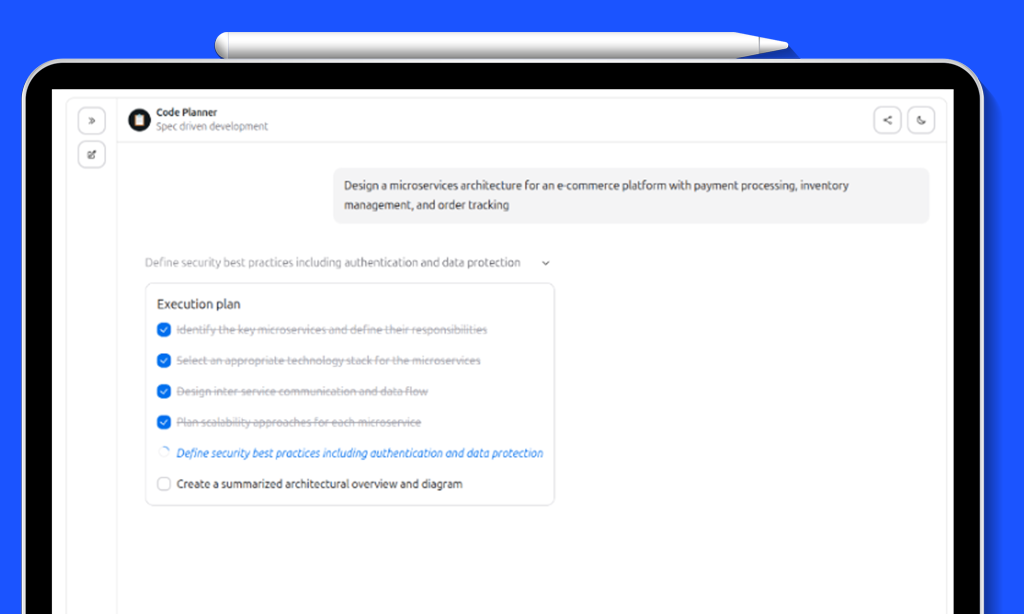
- Real-time execution plan UI with animated task status in the chat interface
- Long-term semantic memory for storing and retrieving facts across conversations
- Frontend performance fix preventing OOM on high-throughput SSE streams
- UI polish: improved live-update animations and links now open in new tabs
- Configurable startup questions displayed as clickable buttons on the chat welcome screen
Planning Tools for AI Agents
When an agent receives a complex, multi-faceted query, a single-shot response often produces shallow or disorganized output. The agent needs a way to decompose the request into focused subtasks, work through each one sequentially, and build context progressively so that later tasks benefit from earlier results.
ragbits 1.6 solves this with a lightweight planning system exposed as standard agent tools. Instead of an external orchestrator that drives the agent programmatically, the agent itself decides when and how to plan, using the same tool-calling mechanism it already uses for everything else.
The planning system has two parts: a PlanningState object that holds the current plan, and a create_planning_tools() factory that returns six tool functions the agent can call:
- create_plan(goal, tasks), break down a goal into ordered subtasks
- get_current_task(), get the next pending task and mark it as in-progress
- complete_task(result), record the outcome and advance to the next task
- add_task(description, position), dynamically add tasks discovered during execution
- remove_task(task_id), remove tasks that are no longer needed
- clear_plan(), abandon the current plan and start fresh
The key design insight is that these are plain functions with rich docstrings. The LLM reads the docstrings, understands what each tool does, and decides autonomously when planning is appropriate. Simple queries get direct answers. Complex queries trigger plan creation.
Example: Software architecture agent
The following example creates a software architect agent that uses planning tools to break down complex design requests into focused subtasks:
from ragbits.AI agents import Agent, AgentOptions
from ragbits.AI agents.tools.planning import PlanningState, create_planning_tools
from ragbits.core.llms import LiteLLM

planning_state = PlanningState()
agent = Agent(
    llm=LiteLLM("gpt-4.1-mini"),
    prompt="""
    You are an expert software architect with planning capabilities.

    For complex design requests:
    1. Use `create_plan` to break down the task into focused subtasks
    2. Work through each task using `get_current_task` and `complete_task`
    3. Build on context from completed tasks

    Cover: technology stack, architecture patterns, scalability, and security.
    """,
    tools=create_planning_tools(planning_state),
    default_options=AgentOptions(max_turns=50),
)async for chunk in agent.run_streaming("Design a scalable e-commerce platform for 100k+ users"):

    match chunk:

        case str():

            print(chunk, end="")
Full example: https://github.com/deepsense-ai/ragbits/blob/main/examples/AI agents/planning.py
When the agent receives “Design a scalable e-commerce platform” it autonomously calls create_plan to decompose the request into subtasks. It then works through each task sequentially, with each subsequent task having access to the context built by earlier ones. The result is a comprehensive, well-structured response that no single-shot generation could match.
Design philosophy: let the LLM drive
The planning system exposes planning as standard tools and trusts the agent to decide when and how to use them. The agent has full autonomy: it can create plans with as many or as few tasks as needed, dynamically add tasks when it discovers new requirements mid-execution, skip planning entirely for simple queries, and adapt its approach based on intermediate results.
Under the hood, PlanningState holds a Plan model with computed properties for current_task, is_complete, completed_tasks, and pending_tasks. The six tool functions are closures that capture a shared PlanningState instance, a clean pattern for creating stateful tool sets without requiring global state. Each function has a rich docstring that serves as the tool description for the LLM.
Real-Time Execution Plan UI
Planning is useful for the agent, but equally valuable for the user. When an agent breaks a complex request into five subtasks and works through them for 30 seconds, the user should not stare at a blank screen. They should see exactly what the agent is working on, what it has completed, and what remains.
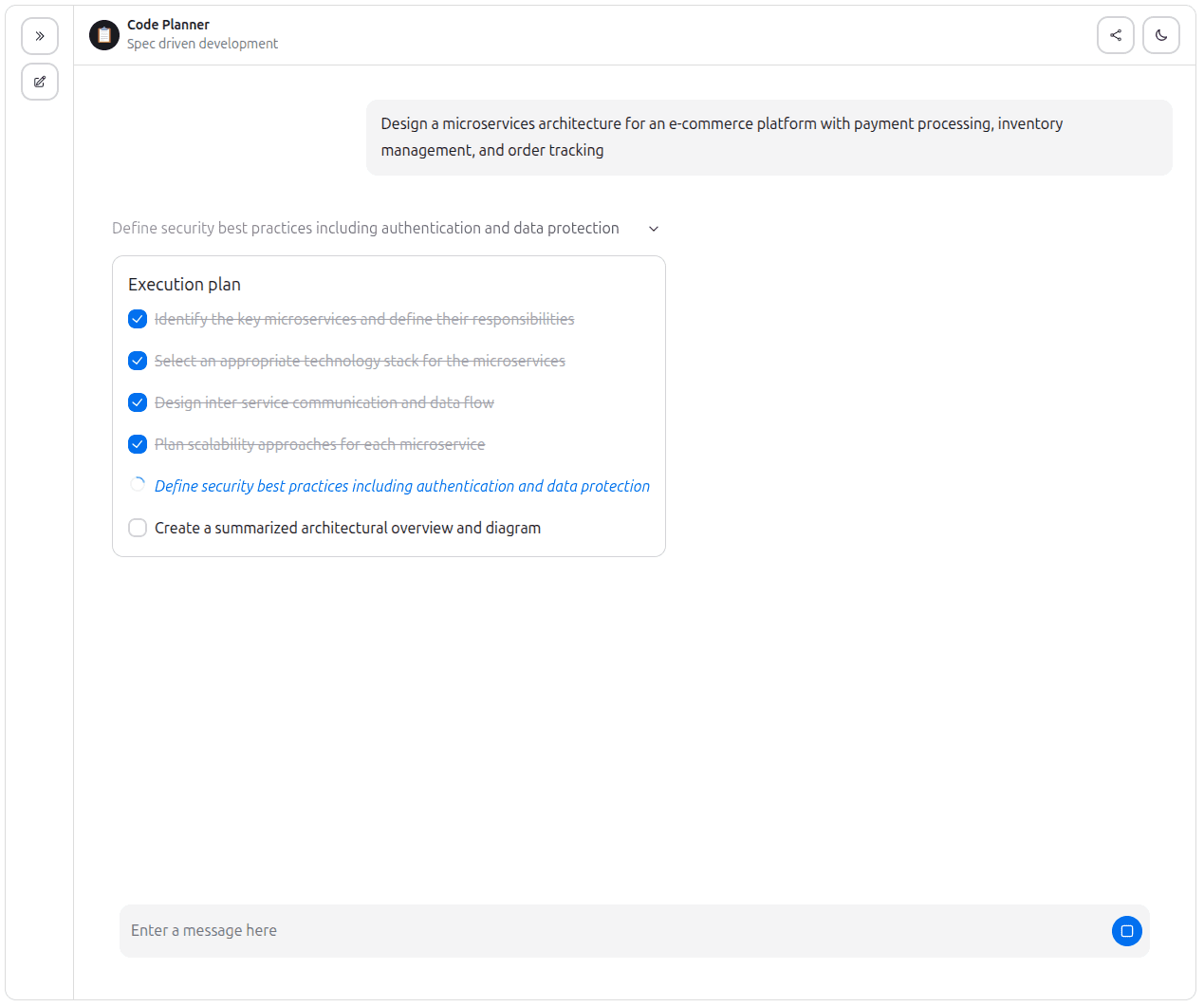
ragbits 1.6 adds a TodoList component to the chat UI that renders the agent’s execution plan as an interactive, animated checklist, giving users real-time visibility into multi-step agent workflows.
Visual states
Each task in the plan displays one of three visual states:
- Pending, normal text with an unchecked checkbox, waiting to be started
- In progress, italic text in the primary color with a spinning progress indicator
- Completed, strikethrough text in a muted color with a checked checkbox
Tasks support parent-child relationships for hierarchical plans, rendered with progressive indentation. The entire component is animated with smooth fade-in and slide-down transitions as tasks are created and updated.
Chat interface integration
Integrating planning into a chat application requires just a few lines of glue code in the ChatInterface implementation:
from ragbits.AI agents import Agent, AgentOptions, ToolCall, ToolCallResult
from ragbits.AI agents.tools.planning import PlanningState, create_planning_tools
from ragbits.chat.interface import ChatInterface
from ragbits.chat.interface.types import ChatContext, ChatResponseUnion, LiveUpdateType

class CodePlannerChat(ChatInterface):
    conversation_history = True

    def __init__(self):
        self.planning_state = PlanningState()
        self.agent = Agent(
            llm=LiteLLM("gpt-4.1-mini"),
            prompt=CodePlannerPrompt,
            tools=create_planning_tools(self.planning_state),
        )

    async def chat(self, message, history, context):
        async for response in self.agent.run_streaming(CodePlannerInput(query=message)):
            match response:
                case str():
                    yield self.create_text_response(response)
                case ToolCall():
                    if response.name == "create_plan":
                        yield self.create_live_update(
                            response.id, LiveUpdateType.START, "Creating plan..."
                        )
                case ToolCallResult():
                    if response.name == "create_plan" and self.planning_state.plan:
                        yield self.create_live_update(
                            response.id, LiveUpdateType.FINISH, "Plan created",
                            f"{len(self.planning_state.plan.tasks)} tasks"
                        )
                        for task in self.planning_state.plan.tasks:
                            yield self.create_plan_item_response(task)
Full example: https://github.com/deepsense-ai/ragbits/blob/main/examples/chat/code_planner.py
Run it with:
ragbits api run examples.chat.code_planner:CodePlannerChat
The create_plan_item_response() helper on ChatInterface wraps any Task object into an SSE event that the frontend handles automatically. Combined with create_live_update() for progress indicators, this gives users a rich, real-time view of the agent’s planning and execution process.
Long-Term Semantic Memory
AI Agents are stateless by default. The keep_history option preserves conversation context within a single session, but when the session ends, everything is forgotten. For many real-world applications, personal assistants, customer support, coaching tools, this is a fundamental limitation. Users expect the system to remember them.
ragbits 1.6 introduces LongTermMemory, a persistent memory system that allows AI agents to store facts from conversations and retrieve them later across entirely separate sessions using vector similarity search. The agent can “remember” users over time, enabling personalized and contextually-aware interactions.
Architecture
The memory system has three layers:
- MemoryEntry, a Pydantic model representing a single fact: who it belongs to (key), what was remembered (content), when (timestamp), and a unique ID (memory_id)
- LongTermMemory, the core class with four async operations: store_memory, retrieve_memories (semantic search), get_all_memories, and delete_memory
- create_memory_tools(), a factory that wraps LongTermMemory into agent-callable tools (store_memory and retrieve_memories), pre-bound to a specific user ID
The system builds on ragbits’ existing VectorStore abstraction, which means it is backend-agnostic. The example below uses InMemoryVectorStore for simplicity, but swapping to ChromaDB, PgVector, Qdrant, or Weaviate is a one-line change.
Example: Agent with and without memory
The most compelling way to demonstrate long-term memory is a side-by-side comparison. Two AI agents receive the same sequence of messages. One has memory tools, the other does not:
from ragbits.AI agents import Agent
from ragbits.AI agents.tools.memory import LongTermMemory, create_memory_tools
from ragbits.core.embeddings import LiteLLMEmbedder
from ragbits.core.llms import LiteLLM
from ragbits.core.vector_stores.in_memory import InMemoryVectorStore

# Initialize
embedder = LiteLLMEmbedder(model_name="text-embedding-3-small")
vector_store = InMemoryVectorStore(embedder=embedder)
memory = LongTermMemory(vector_store=vector_store)
llm = LiteLLM(model_name="gpt-4o-mini")

# Agent with memory for user_123
agent = Agent(
    llm=llm,
    prompt="""You are a helpful assistant with long-term memory.
    Store important facts from conversations.
    Always retrieve memories to provide personalized responses.""",
    tools=create_memory_tools(memory, user_id="user_123"),
    keep_history=False,  # No session history, memory only
)
Full example: https://github.com/deepsense-ai/ragbits/blob/main/examples/AI agents/memory_tool_example.py
The difference is dramatic. Without memory, the agent asks “where are you going?” because it has no context. With memory, it immediately retrieves the stored hiking preference and Rome trip, and suggests hiking trails near Rome like the Castelli Romani hills. The full example output illustrates this clearly
Chat UI Improvements
Beyond the major features, ragbits 1.6 includes several quality-of-life improvements to the chat interface.
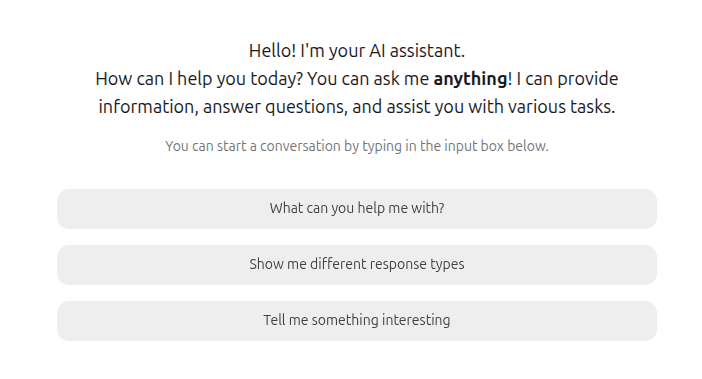
Startup questions allow developers to configure a set of clickable prompt buttons displayed on the welcome screen before any conversation begins. Users can tap a question to instantly send it, reducing the blank-page problem and guiding first-time users toward the agent’s capabilities. Configuration is a single field on UICustomization.
The live-update animation system was also refined: the shimmer effect was replaced with a smoother pulsing text animation, and all links in chat messages and live updates now open in a new browser tab, preventing users from accidentally navigating away from their conversation.
Wrapping up
ragbits 1.6 addresses three fundamental challenges in agentic AI: handling complexity through structured planning, maintaining transparency through real-time execution visibility, and enabling personalization through persistent memory.
The planning system exposes planning as standard tools and trusts the agent to decide when and how to plan. The execution plan UI gives users a window into the agent’s work in real time, building trust and understanding. And long-term memory bridges the gap between sessions, enabling AI agents that truly “know” their users over time.We’re open-sourcing the same patterns we rely on internally. Follow the project at GitHub and help shape what comes next.
Update autors: Jakub Duda, Dawid Żywczak, Michał Rdzany, Cezary Gorczyński, Michał Pstrąg, Michał Koruszowic, Michael McCulloch, Szymon Janowski