Table of contents
AI Agents are the most talked-about pattern in GenAI engineering, and one of the hardest to get right in production. The core loop (LLM decides, tool executes, LLM reflects) is straightforward in a notebook. Making it reliable, observable, and safe inside a real organization is a different problem entirely.
When an AI agent decides to call a tool, who validates the input? When it returns sensitive data, who masks it before the LLM sees it? When a destructive action is about to execute, who asks the user for confirmation? When multiple tools are called, do they run sequentially or in parallel? When one agent needs to delegate to another, how do you stream intermediate results?
ragbits 1.5 provides answers to all of these. This release introduces a reworked AI agent architecture with first-class support for lifecycle hooks, tool confirmation, parallel execution, and hierarchical multi-agent setups. For teams already using ragbits, this is the agentic upgrade we previewed in the 1.4 roadmap. For teams evaluating frameworks, this post walks through every new capability step by step.
What is ragbits?
Before diving into the new agent features, it is useful to understand the broader context of ragbits.
ragbits is an open-source Python framework that provides modular building blocks for GenAI applications designed to help teams build production-ready AI applications faster. Instead of wiring together LLM APIs, vector stores, ingestion pipelines, chat interfaces, and agent orchestration from scratch, ragbits provides modular building blocks that cover the most common GenAI system components.
The framework supports the full lifecycle of modern GenAI applications, including:
- RAG pipelines for document ingestion, indexing, and retrieval
- LLM orchestration with type-safe prompts and model abstraction
- Agentic workflows that combine LLM reasoning with external tools
- Evaluation, guardrails, and observability for production deployments
Because the components are modular, teams can adopt ragbits incrementally, using only the pieces they need while integrating with existing infrastructure and vector databases. The goal is simple: move from prototype to production GenAI systems without rebuilding the stack at every stage.
What is new?
Release 1.5 focuses on the AI agent layer. Every feature below addresses a specific production challenge that emerges when moving agentic systems from prototype to deployment:
- Class-based agent definitions for cleaner, more testable code
- Thinking support for transparent agent reasoning
- Lifecycle hooks (pre-run, pre-tool, post-tool, post-run, on-event) for validation, masking, and observability
- Built-in tool confirmation for destructive operations
- Parallel tool calling for performance
- Downstream agents as tools for hierarchical architectures
- Streaming from downstream agents for real-time transparency
- ToolReturn for controlling what the LLM sees vs. what the application retains
- Passing raw Tool objects for flexible tool configuration and dynamic injection
Class-based Agents
Agent definitions in earlier versions required manual wiring of prompts, input models, and tool configurations across multiple objects. This worked, but as agent complexity grew, the setup became harder to read, test, and maintain.
ragbits 1.5 introduces a class-based syntax that consolidates everything into a single, self-contained definition. System and user prompts are class variables, and input models are bound via a decorator:
from pydantic import BaseModel
from ragbits.agents import Agent, AgentOptions
from ragbits.core.llms import LiteLLM

# ... (get_weather tool definition omitted for brevity)

class WeatherInput(BaseModel):
    location: str

@Agent.prompt_config(WeatherInput)
class WeatherAgent(Agent):
    system_prompt = """
    You are a helpful assistant that responds to user questions about weather.
    """
    user_prompt = """
    Tell me the temperature in {{ location }}.
    """

llm = LiteLLM(model_name="gpt-4.1", use_structured_output=True)
agent = WeatherAgent(
    llm=llm,
    tools=[get_weather],
    default_options=AgentOptions(max_total_tokens=500, max_turns=5),
)
response = await agent.run(WeatherInput(location="Paris"))
Full example: https://github.com/deepsense-ai/ragbits/blob/main/examples/agents/with_decorator.py
The @Agent.prompt_config decorator creates a Prompt class under the hood, binding the input model fields to the Jinja2 template variables in user_prompt. The result is a definition that is concise, type-safe, and straightforward to unit test.
Thinking Support in Agents
Reasoning models, such as Claude with extended thinking or OpenAI’s o-series, can expose their chain-of-thought before producing a final answer. This is valuable for debugging, evaluation, and building user trust. However, integrating reasoning into an agent loop requires handling a new type of streamed content alongside text, tool calls, and tool results.
ragbits 1.5 adds first-class support for reasoning in agents. Enable it with two options: reasoning_effort (or thinking) on the LLM, and log_reasoning on the agent:
from ragbits.agents import Agent, AgentOptions
from ragbits.core.llms import LiteLLM, LiteLLMOptions

llm = LiteLLM(model_name="claude-sonnet-4-20250514")

agent = Agent(
    llm=llm,
    prompt="You are a helpful assistant.",
    tools=[get_weather],
)

# Enable reasoning
options = AgentOptions(
    log_reasoning=True,
    llm_options=LiteLLMOptions(reasoning_effort="high"),
)

result = await agent.run("What should I wear in Paris today?", options=options)
print(result.reasoning_traces)  # ["The user wants to know...", ...]
print(result.content)          # "Based on the current weather in Paris..."
In streaming mode, reasoning chunks arrive as Reasoning objects that you can display in real time, giving users a window into the agent’s thought process before the final answer appears:
from ragbits.core.llms.base import Reasoning

async for chunk in agent.run_streaming("What should I wear in Paris today?", options=options):
    match chunk:
        case Reasoning():
            print(f"Thinking: {chunk}", end="")
        case str():
            print(f"Answer: {chunk}", end="")
Reasoning traces are only collected when log_reasoning=True, so there is no overhead when the feature is not needed. The collected traces are available in AgentResult.reasoning_traces for post-execution analysis, evaluation, or audit logging.
AI Agent Hooks
Hooks are the most impactful addition in 1.5. In production, the agent loop is never just “LLM decides, tool executes.” There are always cross-cutting concerns: input validation, access control, PII masking, audit logging, guardrails. Without a structured mechanism, these end up scattered across tool implementations or bolted on with ad-hoc middleware.
ragbits hooks intercept the agent lifecycle at five well-defined points:
- pre-run: before the agent starts processing. Input validation, guardrails, request transformation.
- pre-tool: before a tool executes. Argument validation, access control, confirmation requests.
- post-tool: after a tool completes. Output masking, logging, enrichment.
- post-run: after the agent finishes. Response transformation, final logging.
- on-event: during streaming. Real-time content transformation or filtering.
Hooks execute in priority order (lower numbers first) and support chaining: the output of one hook becomes the input of the next. They can be scoped to specific tools via the tool_names parameter.
Use case: input validation and data masking
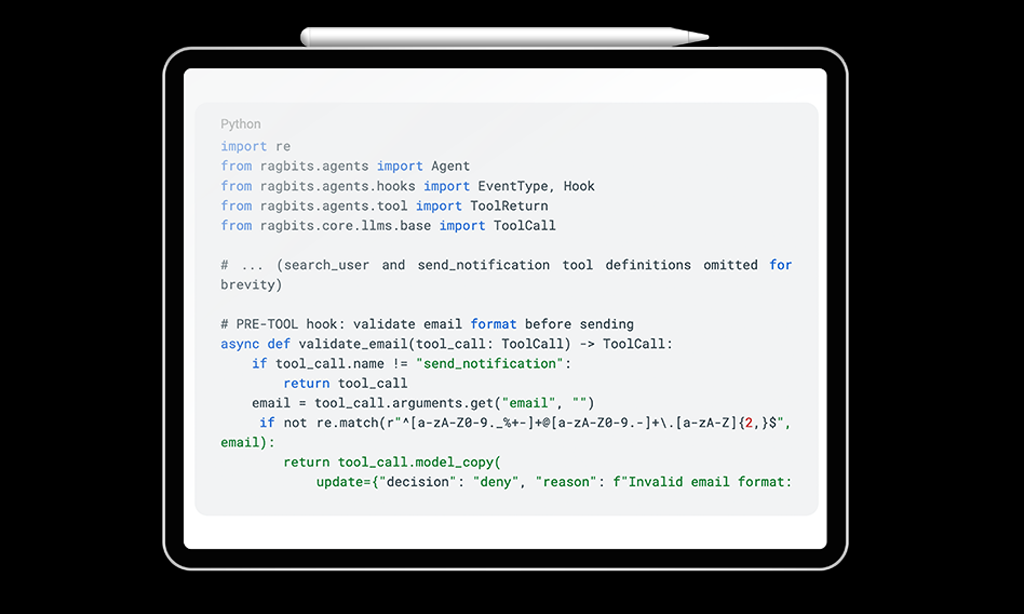
Consider a customer support agent that looks up user records and sends notifications. Two requirements emerge immediately: validate email addresses before sending, and mask sensitive fields (like SSNs) so the LLM never sees them. With hooks, these are separate, composable concerns:
import re
from ragbits.agents import Agent
from ragbits.agents.hooks import EventType, Hook
from ragbits.agents.tool import ToolReturn
from ragbits.core.llms.base import ToolCall

# ... (search_user and send_notification tool definitions omitted for brevity)

# PRE-TOOL hook: validate email format before sending
async def validate_email(tool_call: ToolCall) -> ToolCall:
    if tool_call.name != "send_notification":
        return tool_call
    email = tool_call.arguments.get("email", "")
    if not re.match(r"^[a-zA-Z0-9._%+-]+@[a-zA-Z0-9.-]+\.[a-zA-Z]{2,}$", email):
        return tool_call.model_copy(
            update={"decision": "deny", "reason": f"Invalid email format: {email}"}
        )
    return tool_call

# PRE-TOOL hook: redirect unapproved domains
async def sanitize_email_domain(tool_call: ToolCall) -> ToolCall:
    if tool_call.name != "send_notification":
        return tool_call
    email = tool_call.arguments.get("email", "")
    approved_domains = ["example.com", "test.com"]
    domain = email.split("@")[-1] if "@" in email else ""
    if domain not in approved_domains:
        modified_args = tool_call.arguments.copy()
        modified_args["email"] = email.split("@")[0] + "@example.com"
        return tool_call.model_copy(update={"arguments": modified_args})
    return tool_call

# POST-TOOL hook: mask SSN in search results before LLM sees them
async def mask_sensitive_data(tool_call: ToolCall, tool_return: ToolReturn) -> ToolReturn:
    if tool_call.name != "search_user":
        return tool_return
    if isinstance(tool_return.value, dict) and "ssn" in tool_return.value:
        masked = tool_return.value.copy()
        masked["ssn"] = "***-**-****"
        return ToolReturn(masked)
    return tool_return

agent = Agent(
    llm=llm,
    tools=[search_user, send_notification],
    hooks=[
        Hook(event_type=EventType.PRE_TOOL, callback=validate_email,
            tool_names=["send_notification"], priority=10),
        Hook(event_type=EventType.PRE_TOOL, callback=sanitize_email_domain,
            tool_names=["send_notification"], priority=20),
        Hook(event_type=EventType.POST_TOOL, callback=mask_sensitive_data,
            tool_names=["search_user"], priority=10),
    ],
)
Full example: https://github.com/deepsense-ai/ragbits/blob/main/examples/agents/hooks/validation_and_sanitization.py
Notice how hooks chain: validate_email runs at priority 10, sanitize_email_domain at priority 20. If validation denies the call, sanitization never executes. If validation passes, the sanitized arguments flow to the tool. The post-tool hook then masks sensitive fields before the LLM sees the response. None of this logic lives inside the tool implementations themselves.
Use case: guardrails with pre-run hooks
Pre-run hooks intercept the agent before it starts processing. This is the natural place for guardrails, whether that means checking user input against content policies, topic restrictions, or compliance rules:
from ragbits.guardrails.base import Guardrail, GuardrailManager, GuardrailVerificationResult

class BlockedTopicsGuardrail(Guardrail):
    def __init__(self, blocked_topics: list[str]):
        self.blocked_topics = blocked_topics

    async def verify(self, input_to_verify: str) -> GuardrailVerificationResult:
        for topic in self.blocked_topics:
            if topic in input_to_verify.lower():
                return GuardrailVerificationResult(
                    guardrail_name=self.__class__.__name__,
                    succeeded=False,
                    fail_reason=f"Input contains blocked topic: {topic}",
                )
        return GuardrailVerificationResult(
            guardrail_name=self.__class__.__name__, succeeded=True, fail_reason=None
        )

guardrail_manager = GuardrailManager(
    guardrails=[BlockedTopicsGuardrail(blocked_topics=["politics", "religion"])]
)

def create_guardrail_hook(manager):
    async def hook(input, options, context):
        results = await manager.verify(str(input or ""))
        for result in results:
            if not result.succeeded:
                return f"I cannot help with that request. Reason: {result.fail_reason}"
        return input
    return hook

agent = Agent(
    llm=LiteLLM("gpt-4.1"),
    prompt="You are a helpful assistant.",
    hooks=[
        Hook(event_type=EventType.PRE_RUN, callback=create_guardrail_hook(guardrail_manager)),
    ],
)
Full example: https://github.com/deepsense-ai/ragbits/blob/main/examples/agents/hooks/guardrails_integration.py
The guardrail runs before the LLM is even invoked. If the input is rejected, the agent returns the rejection message directly, with no tokens consumed, no tools called, and no risk of the LLM generating an undesirable response.
Tool Confirmation
Agents that can take real-world actions such as deleting files, sending emails, or modifying databases need a safety mechanism. In production, not every tool call should execute automatically. Some require explicit user approval.
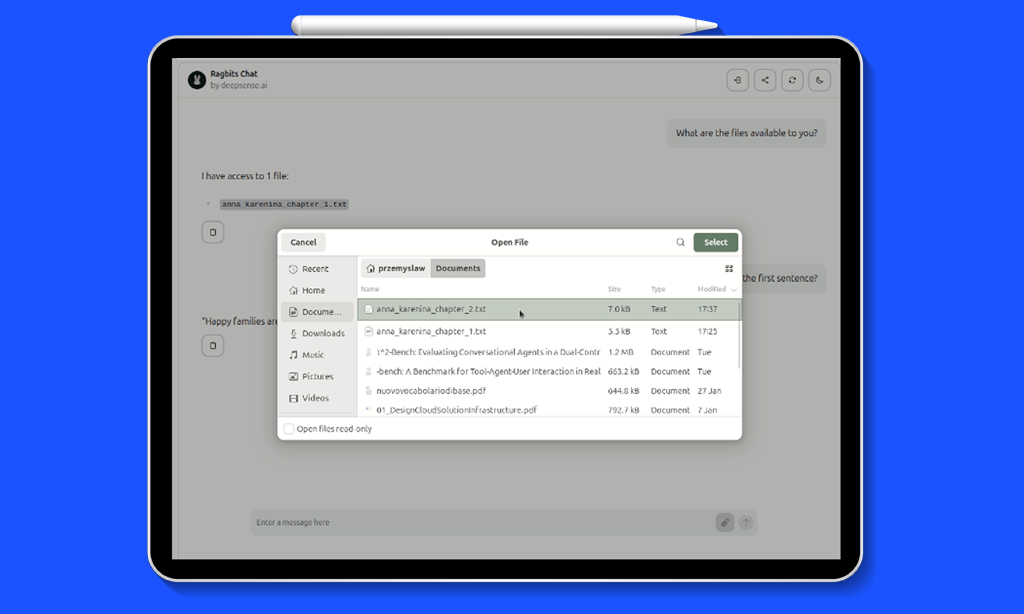
ragbits 1.5 solves this with a built-in confirmation flow. A pre-tool hook can return decision=”ask”, which pauses the agent, sends a ConfirmationRequest to the frontend, and waits for user approval. The ragbits UI renders a confirmation dialog automatically. One line is all it takes:
from ragbits.agents.hooks.confirmation import create_confirmation_hook

agent = Agent(
    llm=llm,
    tools=[list_files, read_file, create_file, delete_file, move_file],
    hooks=[
        create_confirmation_hook(
            tool_names=["create_file", "delete_file", "move_file"]
        )
    ],
)
Read-only tools (list_files, read_file) execute immediately. Destructive tools (create_file, delete_file, move_file) pause and ask the user first. The confirmation dialog shows the tool name and arguments, so the user knows exactly what they are approving.
Under the hood, create_confirmation_hook is a convenience factory that creates a pre-tool hook returning decision=”ask”. You can also write custom confirmation logic, for example only requiring approval when a file size exceeds a threshold, or when the user lacks admin permissions.
Parallel Tool Calling
When an LLM requests multiple tool calls in a single response, the default behavior is sequential execution. This is wasteful for I/O-bound tools like API calls, database queries, or network requests that spend most of their time waiting.
ragbits 1.5 adds parallel execution as a single option:

from ragbits.agents import Agent, AgentOptions

agent = Agent(

    llm=llm,

    prompt="You are a research assistant.",

    tools=[search_web, query_database, fetch_weather],

    default_options=AgentOptions(parallel_tool_calling=True),

)
When the LLM requests search_web, query_database, and fetch_weather simultaneously, all three execute concurrently via asyncio. Synchronous tools are automatically wrapped with asyncio.to_thread so they do not block the event loop. Results are yielded as they complete.
Downstream Agents as Tools
Complex problems often require specialized knowledge. A single system prompt can only stretch so far before the LLM’s performance degrades. The production pattern is decomposition: a parent agent that delegates to specialists.
ragbits 1.5 makes this trivial. You can pass Agent instances directly as tools to a parent agent. The parent’s LLM sees each specialist as a callable tool and decides when to delegate, based on the specialist’s name and description:
from ragbits.agents import Agent

# Specialist agents
diet_agent = Agent(
    name="diet_expert",
    description="A nutrition expert who provides diet plans and healthy eating advice",
    llm=llm,
)

fitness_agent = Agent(
    name="fitness_coach",
    description="A personal trainer who creates workout routines and exercise plans",
    llm=llm,
)

# Parent agent with both expert agents as tools

health_assistant = Agent(

    name="health_assistant",

    llm=llm,

    tools=[diet_agent, fitness_agent],

)

response = await health_assistant.run(
    "I want to lose 10kg in 3 months. Can you help me with a plan?"
)
When you pass an Agent to the tools list, ragbits automatically wraps it using Tool.from_agent(). The tool parameters are inferred from the downstream agent’s prompt input model. No manual schema wiring required.
Hooks compose naturally with this pattern. For example, you can add a post-tool hook to the parent agent that logs every specialist’s output:
from ragbits.agents.hooks import EventType, Hook
from ragbits.agents.tool import ToolReturn
from ragbits.core.llms.base import ToolCall

async def log_agent_output(tool_call: ToolCall, tool_return: ToolReturn) -> ToolReturn:
    print(f"[{tool_call.name}] output: {tool_return.value}")
    return tool_return

health_assistant = Agent(
    name="health_assistant",
    llm=llm,
    tools=[diet_agent, fitness_agent],
    hooks=[
        Hook(
            event_type=EventType.POST_TOOL,
            callback=log_agent_output,
            tool_names=["diet_expert", "fitness_coach"],
        ),
    ],
)
Full example: https://github.com/deepsense-ai/ragbits/blob/main/examples/agents/hooks/agent_output_logging.py
Streaming from Downstream Agents
When a parent agent delegates to a specialist, the user typically waits for the full response before seeing anything. For long-running agents, this creates a poor experience. ragbits 1.5 enables real-time streaming from downstream agents:
from ragbits.agents import AgentRunContext, DownstreamAgentResult

# ... (agent definitions omitted, see downstream agents section above)

context = AgentRunContext(stream_downstream_events=True)

async for chunk in health_assistant.run_streaming(
    "Create a detailed weekly meal plan",
    context=context,
):
    if isinstance(chunk, DownstreamAgentResult):
        agent_name = context.get_agent(chunk.agent_id).name
        print(f"[{agent_name}] {chunk.item}")
    else:
        print(f"[health_assistant] {chunk}")
Full example: https://github.com/deepsense-ai/ragbits/blob/main/examples/agents/downstream_agents_streaming.py
The stream_downstream_events=True flag enables this behavior. Each streamed chunk from a downstream agent is wrapped in a DownstreamAgentResult, which includes the agent_id so you can identify which specialist is producing the output. This works recursively: if a downstream agent itself has downstream agents, their events bubble up through the chain.
Tool Return
Not everything a tool produces should be sent to the LLM. API responses often contain metadata, raw payloads, timing information, or sensitive data that the LLM does not need, and that may waste context window tokens or create security exposure.
The ToolReturn mechanism lets you separate what the LLM sees from what your application retains:
from ragbits.agents.tool import ToolReturn

def search_database(query: str) -> ToolReturn:
    """Search the internal database."""
    results = db.query(query)
    return ToolReturn(
        value=f"Found {len(results)} results matching '{query}'",  # LLM sees this
        metadata={"raw_results": results, "query_time_ms": 42},   # app-only
    )
Tools can also be async generators that yield progress events during execution. This is useful for long-running operations where you want to stream intermediate status to the UI while keeping the final result for the LLM:
from collections.abc import AsyncGenerator

async def analyze_document(filepath: str) -> AsyncGenerator[ToolReturn | str]:
    """Analyze a document with progress updates."""
    yield "Reading document..."
    content = read_file(filepath)
    yield "Extracting key topics..."
    topics = extract_topics(content)
    yield "Generating summary..."
    summary = generate_summary(content, topics)
    yield ToolReturn(
        value=f"Summary: {summary}",
        metadata={"topics": topics, "word_count": len(content.split())}
    )
Intermediate string yields are streamed to the application as tool events. Only the final ToolReturn value is sent to the LLM. Post-tool hooks can access both the value and the metadata.
Streaming tool events to the Chat UI
A powerful pattern enabled by ToolReturn and streaming generators is rendering rich content directly in the chat UI while a tool executes. For example, a revenue analytics tool can render a Markdown table as a side effect, while still returning structured data to the LLM for further reasoning:
from collections.abc import Generator
from ragbits.agents import Agent
from ragbits.agents.tool import ToolReturn
from ragbits.chat.interface import ChatInterface
from ragbits.chat.interface.types import ChatContext, TextContent, TextResponse
from ragbits.core.llms import LiteLLM
from ragbits.core.prompt.base import ChatFormat

# ... (fetch_revenue_data mock data source omitted for brevity)

def display_revenue_table(year: int) -> Generator[TextResponse | ToolReturn]:
    """Fetch revenue data and display as a Markdown table."""
    data = fetch_revenue_data(year)
    if data is None:
        yield ToolReturn(value=f"No data for year {year}")
    else:
        rows = "\n".join(f"| {q} | {v} |" for q, v in zip(data.quarters, data.revenue))
        table = f"\n| Quarter | Revenue |\n|---------|---------|
{rows}\n"
        yield TextResponse(content=TextContent(text=table))  # rendered in UI
        yield ToolReturn(value={"year": year, "total": sum(data.revenue)})  # sent to LLM

class RevenueChatInterface(ChatInterface):
    def __init__(self):
        self.agent = Agent(
            llm=LiteLLM(model_name="gpt-4.1"),
            prompt="You are a revenue analytics assistant. "
                  "Use display_revenue_table to show data to the user.",
            tools=[display_revenue_table],
        )

    async def chat(self, message, history, context):
        async for chunk in self.agent.run_streaming(message):
            if isinstance(chunk, str):
                yield self.create_text_response(chunk)
            elif isinstance(chunk, TextResponse):
                yield chunk
Full example: https://github.com/deepsense-ai/ragbits/blob/main/examples/chat/stream_events_from_tools_to_chat.py
Passing Raw Tools to Agents
In previous versions, agents accepted only plain functions or other agents as tools. ragbits 1.5 adds a third option: passing raw Tool objects directly. This gives you full control over the tool’s name, description, parameter schema, and implementation, without relying on automatic introspection from docstrings and type hints.
from ragbits.agents import Agent
from ragbits.agents.tool import Tool

# Create a Tool with full control over all metadata
tool = Tool(
    name="get_weather",
    description="Retrieves current weather for a given location",
    parameters={
        "type": "object",
        "properties": {
            "location": {
                "type": "string",
                "description": "The city and country to get weather for"
            }
        },
        "required": ["location"]
    },
    on_tool_call=my_weather_function,
)

agent = Agent(llm=llm, tools=[tool])
This is particularly useful when integrating tools from external sources such as MCP servers or dynamically generated APIs, where automatic schema extraction from Python type hints is not available. You can also use Tool.from_callable() to convert a function explicitly, or Tool.from_agent() to wrap a downstream agent, giving you the same Tool object that you can inspect, modify, or reuse across multiple agents.
Putting it all together: File Explorer Agent
To demonstrate how these features compose in a real application, we built a File Explorer Agent that manages files through a chat interface. It combines:
- Class-based definition with UI customization
- Tool confirmation for all destructive operations (create, delete, move)
- Path validation for security (sandboxed to a temp/ directory)
- Live updates showing tool execution progress in the chat
- Conversation history for multi-turn interactions
from ragbits.agents import Agent, ToolCallResult
from ragbits.agents._main import AgentRunContext
from ragbits.agents.confirmation import ConfirmationRequest
from ragbits.agents.hooks.confirmation import create_confirmation_hook
from ragbits.chat.interface import ChatInterface
from ragbits.chat.interface.types import (
    ChatContext, ConfirmationRequestContent,
    ConfirmationRequestResponse, LiveUpdateType,
)
from ragbits.chat.interface.ui_customization import HeaderCustomization, UICustomization
from ragbits.core.llms import LiteLLM, ToolCall
from ragbits.core.prompt import ChatFormat

# ... (tool definitions: list_files, read_file, create_file, delete_file,
#      move_file, etc. -- see full example for path validation and security)

class FileExplorerChat(ChatInterface):
    ui_customization = UICustomization(
        header=HeaderCustomization(
            title="File Explorer Agent",
            subtitle="secure file management with confirmation",
        ),
        welcome_message=(
            "Hello! I'm your file explorer agent.\n\n"
            "I can help you manage files:\n"
            "- List and search files\n"
            "- Read file contents\n"
            "- Create, delete, and move files\n\n"
            "I'll ask for confirmation before making any changes."
        ),
    )
    conversation_history = True
    show_usage = True

    def __init__(self):
        self.llm = LiteLLM(model_name="gpt-4.1")
        self.tools = [
            list_files, read_file, get_file_info, search_files,   # read-only
            create_file, delete_file, move_file, create_directory, # destructive
        ]
        self.hooks = [
            create_confirmation_hook(
                tool_names=["create_file", "delete_file", "move_file", "create_directory"]
            )
        ]

    async def chat(self, message, history, context):
        agent = Agent(
            llm=self.llm,
            prompt="You are a file explorer agent. Call tools immediately "
                  "when asked to perform file operations.",
            tools=self.tools,
            hooks=self.hooks,
            history=history,
        )
        agent_context = AgentRunContext()
        agent_context.tool_confirmations = context.tool_confirmations or []

        async for response in agent.run_streaming(message, context=agent_context):
            match response:
                case str():
                    yield self.create_text_response(response)
                case ToolCall():
                    yield self.create_live_update(
                        response.id, LiveUpdateType.START, f"Running {response.name}"
                    )
                case ConfirmationRequest():
                    yield ConfirmationRequestResponse(
                        content=ConfirmationRequestContent(
                            confirmation_request=response
                        )
                    )
                case ToolCallResult():
                    yield self.create_live_update(
                        response.id, LiveUpdateType.FINISH,
                        response.name, str(response.result)[:50]
                    )
Full example: https://github.com/deepsense-ai/ragbits/blob/main/examples/chat/file_explorer_agent.py
Run it with:
ragbits api run examples.chat.file_explorer_agent:FileExplorerChat
Wrapping up
ragbits 1.5 moves the framework from chat toolkit to full agent platform. The hooks system provides the control surface that production systems require (guardrails, access control, PII masking, audit logging) without modifying core agent logic. Tool confirmation ensures destructive operations never execute without explicit approval. Parallel execution removes unnecessary latency. And hierarchical multi-agent architectures let you decompose complex problems into manageable, specialized agents.
These are the patterns we use in our own production deployments, and we are making them available to the community.
To see the latest developments in ragbits, check out github.com/deepsense-ai/ragbits. Feel free to reach out and propose new features.
Update autors: Michał Koruszowic, Alicja Kotyla, Dawid Żywczak, Przemysław Kaleta, Radosław Iżak, Jakub Duda, Dawid Stachowiak