
Table of contents
Voice AI is moving into the interface layer of serious products. Not as a novelty feature, but as a new control surface for work: searching, writing, organizing, translating, and executing actions through spoken interaction. That shift matters because voice in enterprise products increasingly becomes an execution channel, not only a response channel.
Google is bringing conversational voice capabilities into Gmail, Docs, and Keep. OpenAI is pushing real-time voice models that can reason, translate, transcribe, and act during live conversations. ElevenLabs continues to invest in more expressive speech generation, recently announcing its TTS v4 model at the Warsaw summit, and reports increasing revenue streams from its Eleven Agents Platform. Google’s Live API and Thinking Machines’ interaction-model research point in the same direction: AI systems that listen, watch, respond, and use tools continuously rather than waiting for neat turn-based prompts.
The direction is clear: voice is being positioned as an AI interface on par with text and visual modes. Whether that actually becomes the dominant interface remains open, but the production lesson is already clear: the model that responds fastest is not always the one users can trust.
To understand why real-time voice can become risky in enterprise systems, we need to start with the thing voice changes first: trust.
P.S. OpenAI recently released GPT-Live, and while the direction is promising, we’ll wait to say more until it has been tested under real enterprise conditions. We’ll come back with those insights once we have tested it properly.
Voice Is a Trust Interface
Users do not experience model architecture, but they experience:
- timing,
- voice quality,
- how natural the interaction feels,
- confidence,
- whether the bot did what it said it would do.
That is what makes voice different from text. Text creates friction for users because they can stop, reread, compare, copy, and think. Voice removes much of that friction when the interaction feels live. The user has to react while the conversation is still unfolding.
This changes the trust dynamic because a natural voice can make an unverified answer sound correct.
A bot that says, “I’ve updated your account,” creates a different expectation than a text response that says the same thing. In voice, the commitment feels immediate. The user hears confidence before they see proof.
That is useful for adoption, but it is also dangerous in enterprise execution. Users are not reliable judges of whether a voice is real, synthetic, credible, or correct. A fluent voice can increase confidence even when the underlying system still needs to check a policy, confirm consent, write to a CRM, book a meeting, or verify an account state.
The danger is not that voice-agent errors are always bigger than backend automation errors, but that voice can make an automated decision feel understood, confirmed, and complete before the underlying action has been properly verified.
A natural-sounding bot that books the wrong meeting, writes the wrong CRM note, confirms the wrong refund policy, or records the wrong consent is not “almost working.” It is turning conversational fluency into operational risk.
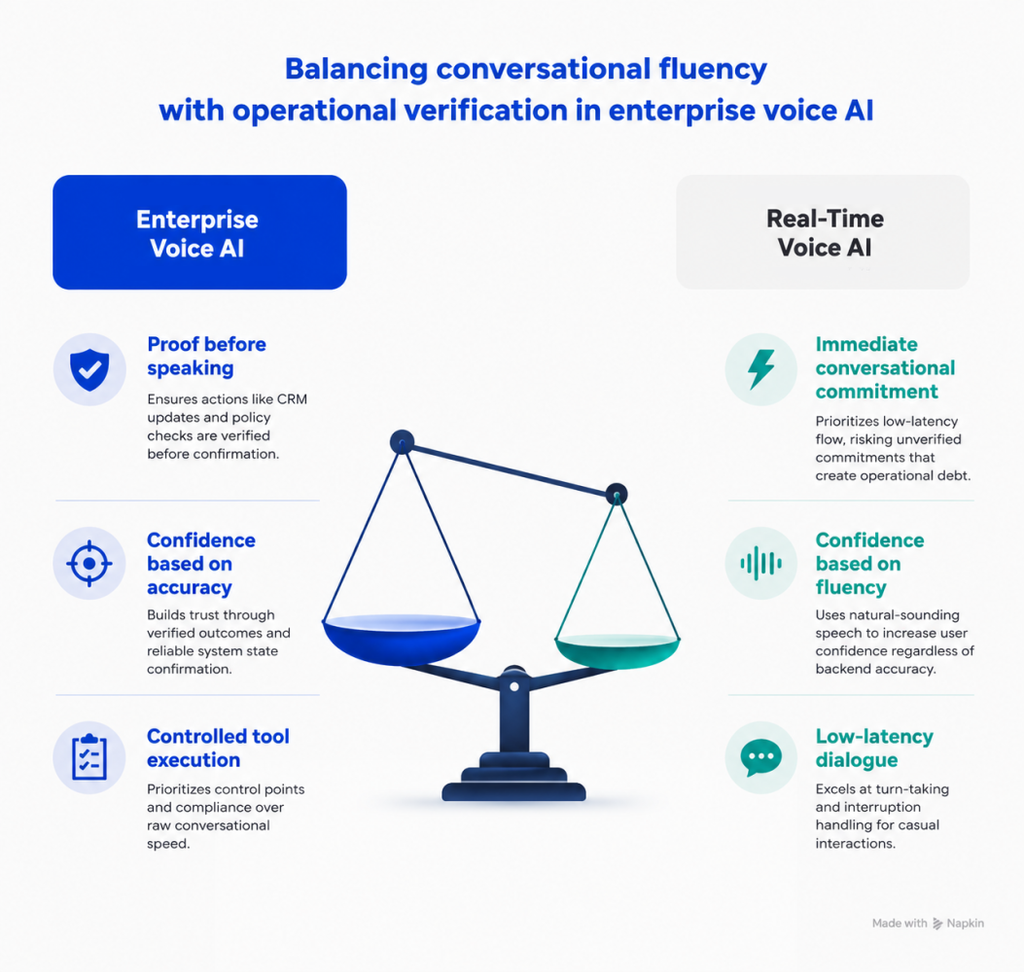
At deepsense.ai, we think unrestricted real-time voice is a trap. Yes, real-time models are excellent for conversational flow, turn-taking, interruption handling, clarification, and low-latency dialogue. The trap begins when teams let those models make enterprise commitments without control points.
For casual conversation, real-time can be enough, but for CRM, scheduling, authentication, compliance, or customer commitments, voice needs proof before it speaks.
That trust problem becomes visible only when the system leaves the demo environment and meets real users. Production is where the failures start to show.
If you’re building enterprise voice AI, this article shows why great demos still fail when latency, tool calling, voice quality, and control meet real users.
Where Enterprise Voice AI Breaks in Production
The difference between a voice AI experiment and a production system is the environment.
The first demo usually works because the setup is controlled:
- a good microphone,
- a quiet room,
- a cooperative user,
- a short task,
- no phone compression,
- no ambiguous consent,
- and no failed CRM write.
Then real users arrive.
The failure modes stop looking like model benchmarks and start looking like bad customer experience. We saw the same patterns repeat when, for example:
- an agent interrupts itself because it hears its own voice,
- automatic language detection flips the conversation because of a single foreign word, brand name, or street address,
- the user says “yes,” but the system cannot tell whether they confirmed the date, the consent statement, the address, or the previous correction,
- the bot keeps the conversation alive while a tool call silently fails,
- the scheduling flow appears complete, but the calendar state is incorrect,
- the voice sounds good in a lab headset but breaks on cheaper phones, in noisy offices, on windy streets, or over weak networks.
This is why building a voice AI demo is easy. With today’s real-time models, a convincing demo can be built quickly. The hard part is everything that comes after: reliability, edge cases, latency, tool orchestration, observability, and user trust.
The bottleneck is no longer just whether the agent can understand what a person says, respond naturally, and avoid long pauses; it is whether the system can do so consistently across thousands of real conversations in unpredictable environments.
One more production issue deserves attention: latency, because in voice, delay quickly becomes experience.
AI Voice Agents & Enterprise Assistants: Lessons Learned from Production
When Latency Becomes a UX Problem in Voice AI
Users do not say, “Your STT, LLM, and TTS pipeline exceeded an acceptable response threshold,” but say that the voicebot:
- felt slow,
- felt awkward,
- kept interrupting.
That distinction matters. Hamming AI’s 2026 latency guide, based on an analysis of more than 4 million production voice-agent calls, makes the same point: users usually report latency as a conversational problem rather than a technical metric.
The same is true for voice quality. Users do not care which provider generated the audio. They care whether the voice sounds natural, stable, respectful, and appropriate for the moment. Zendesk’s 2025 CX research found that 64% of consumers were more likely to trust AI agents that show traits such as friendliness and empathy.
But trust is not unconditional. Gartner found that 64% of customers would prefer companies not to use AI in customer service, with difficulty reaching a human agent among the top concerns. That does not mean users reject AI because they simply want to speak to a person. It means the conversation quality only matters when the system can actually complete the job.
If the workflow breaks, the CRM update fails, the policy check is unclear, or the customer cannot resolve the issue, even the best voice quality will not save the experience. At that point, users need a human not for empathy, but for execution.
That represents the actual gap. Users want fast, natural, conversational service, but they do not want to be trapped inside a system that cannot prove what it is doing.
The answer is not to make every voice interaction slower, but to separate fast conversation from verified business action. Here is what we recommend.
Enterprise Voice AI Architecture: Separate Conversation from Commitment
Production voicebot architecture will not be purely real-time or purely workflow-driven. It will be both:
- Real-time models will handle the live interaction layer: natural turn-taking, acknowledgments, clarification, interruption handling, waiting cues, short answers, context gathering, and low-risk conversation.
- Cascaded workflows will handle the commitment layer: CRM writes, scheduling, identity checks, consent capture, regulated statements, order changes, policy-sensitive answers, and customer commitments.
In other words, production voicebots need two lanes: one lane keeps the conversation moving, and the other proves that the business action is correct. This changes conversation design, too.
We used this deterministic approach in a Voice AI system designed to automate customer service workflows at 500,000+ calls per year, combining constrained LLM use with rule-based conversation flows and system integrations.
Bad voicebot UX overuses short confirmations:
- “Is that correct?”
- “Yes.”
- “Do you want Tuesday?”
- “Yes.”
- “Should I update the CRM?”
- “Yes.”
This looks efficient, but it creates weak input.
Short utterances are fragile in noisy environments. They also lack semantic context. A single “yes” often does not explain what the user actually confirmed: Did they confirm the date or the consent statement? The address, or the previous correction? The CRM update?
Better voicebot design encourages fuller answers:
- “Tell me what you want to change.”
- “Please say the date and time you want me to check.”
- “Can you describe the issue in your own words?”
- “I’ll summarize what I’m about to save. Tell me if anything is wrong.”
This is not just UX polish; it also improves reliability by giving the system richer acoustic and semantic context before it acts.
The same principle applies at the configuration level:
- Constrain agent self-interruption.
- Keep the session language stable rather than switching after a single foreign word.
- Use smaller models for simple, low-risk turns.
- Avoid reasoning-heavy models in the live path unless the delay is acceptable.
- Run tools asynchronously when the next sentence does not depend on the result.
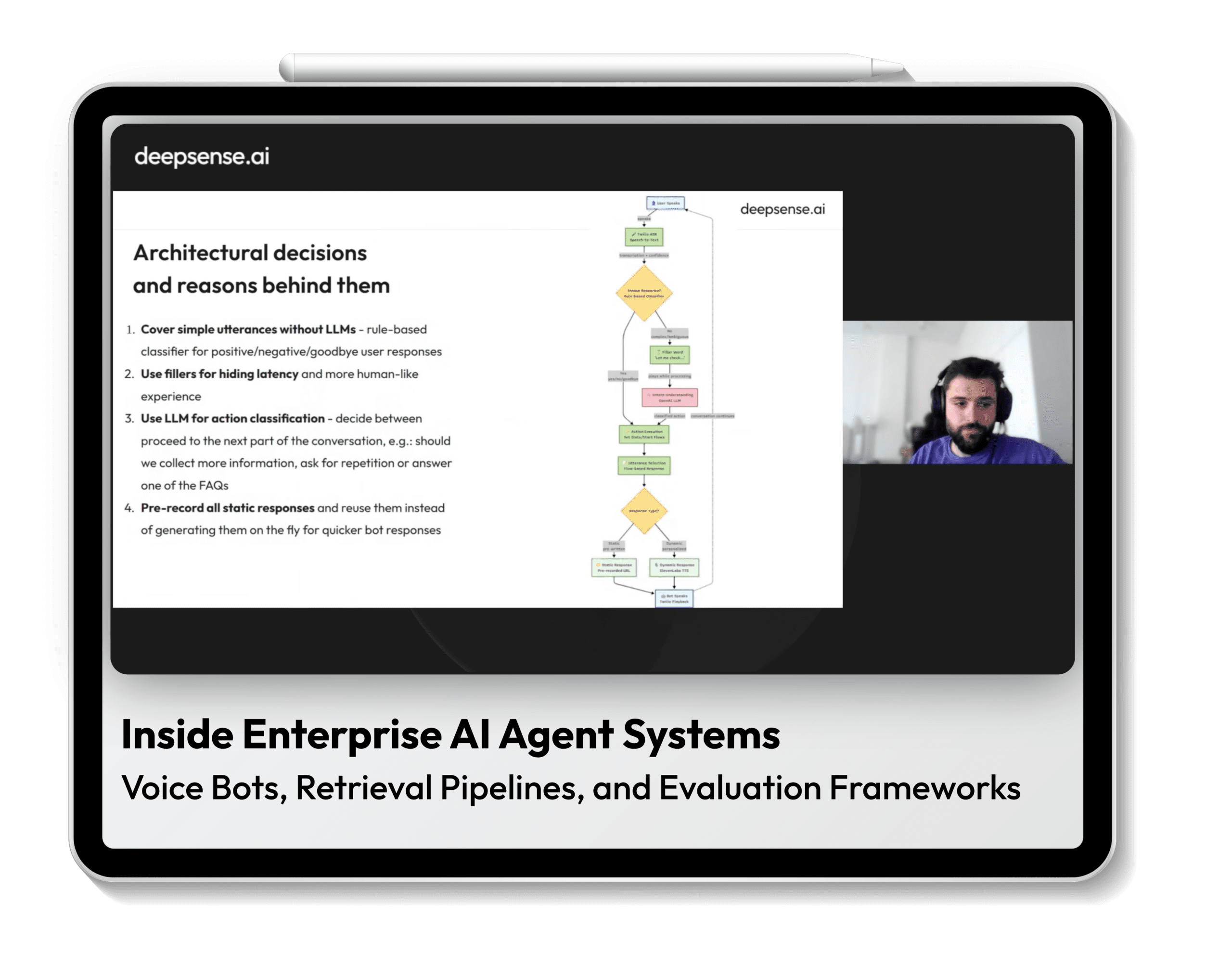
- Detect obvious yes/no intents with lightweight logic instead of routing every micro-turn through a large model.
- Use subtle waiting cues when latency cannot be removed, for example: “I’m verifying that before I confirm,” so the pause feels like a controlled check, not a broken conversation.
- Tune microcopy carefully, because “confirmed,” “great,” “saved,” and “I’ll verify that” mean different things in voice.
OpenAI’s Realtime-2 guidance points in the same direction: stronger real-time reasoning and tool use are useful, but reasoning effort can increase latency, and confirmation boundaries before writing actions should be clearly defined.
That is the enterprise tradeoff. More intelligence can help, but only if the system knows when to slow down.
That separation leads to a practical architecture pattern for enterprise voice AI.
Voice AI Implementation: Real-Time at the Edge, Proof at the Core
A production voicebot should be designed as a controlled interaction system, not just a real-time conversation model.
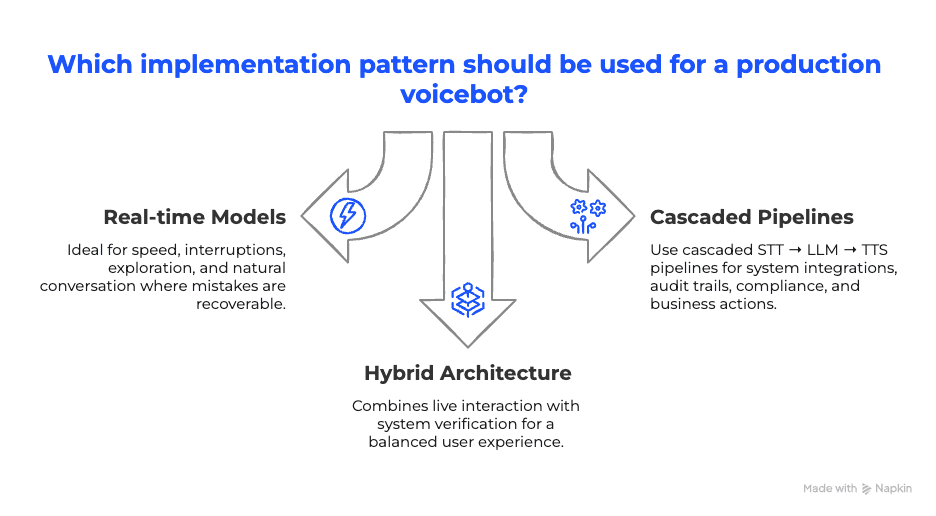
- Use realtime-native models when speed, interruptions, exploration, and natural conversation matter most, and when mistakes are recoverable.
- Use cascaded STT → LLM → TTS pipelines when the system writes to a CRM, books meetings, captures consent, needs an audit trail, handles compliance, or speaks on behalf of the business.
- Use a hybrid architecture when the user experience requires live interaction, but business actions require verification in the system of record.
That is where enterprise voice AI is heading, and it makes architecture more important, not less.
AI Voice Bots for Products, Services, and Operation

Table of contents