
Table of contents
A few years ago, RAG (Retrieval Augmented Generation) was the topic everyone was talking about. New techniques seemed to appear every week: hybrid search, reranking, hierarchical RAG and many more (we covered them in detail in our earlier article). Today, the buzz has faded. When was the last time you heard about a fancy new chunking method or embedding technique? So what happened? Did RAG turn out to be a dead end?
Table of contents
The short answer is no. Classic RAG, meaning enriching an LLM’s context with data retrieved through semantic search (chunking, embeddings, and everything that comes with them), is still a powerful technique. But AI systems have become far more advanced, and relying on RAG alone is no longer enough. It hasn’t been replaced; it has become one piece of a larger puzzle. Modern systems need to pull data from many different sources. Some of it suits the classic semantic search approach, and some don’t. They might be structured, unstructured and change dynamically. Moreover, rapid advances in LLMs now enable search methods that go beyond classic RAG. For all these reasons, we now reach for additional solutions: structured retrieval, knowledge graphs, tool access, and the ability for models to reflect on their own results. In other words, we’ve moved toward agentic retrieval.
TL;DR
- Classic RAG still works well for documents. Rephrasing vague queries or breaking complex questions into smaller ones can improve retrieval without adding an agent.
- Match the retrieval method to the source. SensAI combines semantic and keyword search for its handbook, uses SQL for skills data, and retrieves live Slack conversations using the requester’s permissions.
- Agents add the most value when the search path depends on what they find. An agent can find a Slack message, open the full thread, and check what the team ultimately decided.
- That flexibility comes with trade-offs. More model calls increase cost and response time, and variable search paths make testing harder. For one source and predictable questions, a fixed pipeline is simpler and more consistent.
Classic RAG
Since our earlier article covers RAG techniques in detail, let’s keep this section short. For a more recent look at what lies beyond simple top-k search, see our deep-dive on enterprise RAG retrieval. When the LLM era began, everyone was amazed by how capable these models were, but they had one major limitation: they only knew what was in their training data. Whether you wanted a chatbot for your product documentation, an assistant for internal company processes, or a tool for searching legal case files, the model had never seen the data it needed. Training a model for each use case was too expensive, so a simpler idea emerged: instead of teaching the model new knowledge, hand it the right information when it needs it. Split your documents into chunks, turn them into embeddings, use semantic search to find the most relevant pieces, and add them to the prompt.
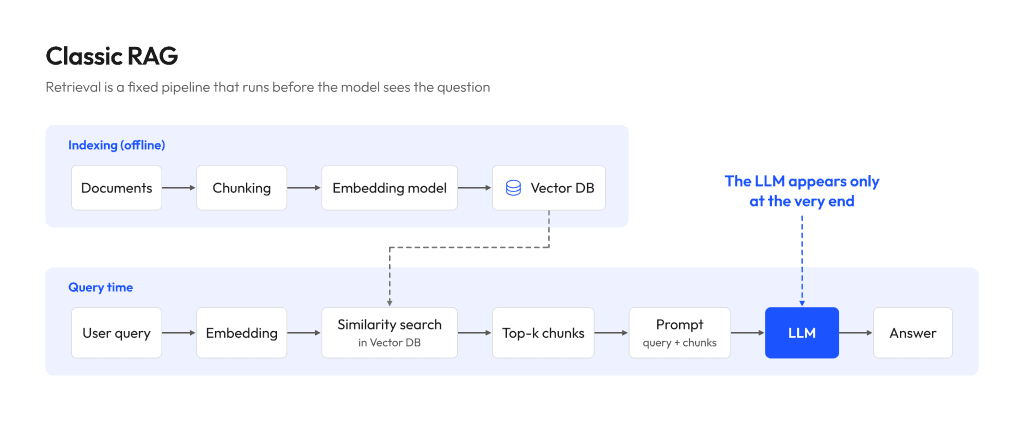
Did it work perfectly? Of course not. Many of you probably remember how unreliable these early systems were. Still, they made it possible to build AI applications for a whole range of new domains. Today, though, our ambitions are bigger. We want LLMs to work not only with static documents but also with Slack messages, Jira tickets, databases, and live data. For that, the classic approach is no longer enough. Before we get to new kinds of data, there’s a weakness worth fixing even when all you have is documents.
Better Retrieval Before Agents
Classic RAG has a weak spot that’s easy to overlook: the whole search depends on a single input, the user’s query, exactly as they typed it. And users don’t write queries with a vector database in mind. They’re vague, they use different words than the documents do, they pack three questions into one sentence, or they write “and what about the second option?” and expect the system to know what they mean.
Does that mean we need to throw out RAG and replace it with a fully agentic system? Not at all. Before reaching for agents, there’s a lot we can improve within the classic pipeline itself, and one of the most effective ideas is surprisingly simple: instead of searching with the raw query, we let an LLM transform it first. The retrieval pipeline stays the same, but the model now gets a say in what we actually search for. This is what query transformation is about, and a few approaches have become standard:
Query Rewriting
The LLM rephrases the query into a clearer, more search-friendly form: it fixes vague wording, expands abbreviations, and adds missing context. In conversational systems this is essential. A follow-up that only makes sense in light of earlier messages gets rewritten into a standalone question, so the search engine doesn’t have to guess what the user is referring to.
Multi-query Generation
Instead of one query, the LLM generates several variations that phrase the question differently or approach it from different angles. Each is searched separately and the results are merged, for example with reciprocal rank fusion. This way, retrieval no longer depends on whether the user happened to use the same words as the documents.
Query Decomposition
Complex questions get split into simpler sub-questions, each searched on its own. When a single query asks about several things at once, its embedding ends up somewhere in between all of them and matches none of the relevant documents particularly well. Separate searches solve that.
HyDE (Hypothetical Document Embeddings)
A slightly counterintuitive trick: the LLM first writes a hypothetical answer, and that answer is used for the search instead of the question. The reasoning is that answers look more like the documents we’re searching for than questions do. Even if the hypothetical answer contains made-up details, its embedding usually lands closer to the right documents.
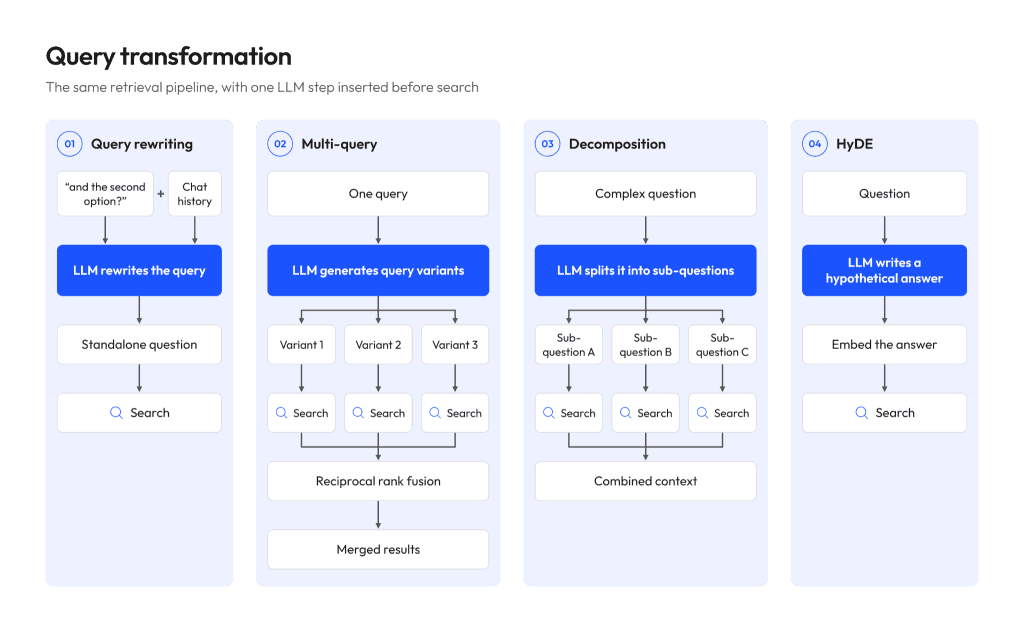
These techniques are cheap to add and often give a noticeable boost in retrieval quality. They also mark an important shift: the LLM is no longer just the final step that reads retrieved chunks and writes an answer. It now takes part in the search itself. For now, though, its role is limited to helping formulate the question, while everything else is still decided by the pipeline. In the following sections, we’ll give it more and more control over the retrieval process.
Retrieval is not Just Vector Search
Before giving the model more control, let’s look at a different limitation: not how we search, but what we search. In classic RAG, “retrieval” and “semantic search” became almost synonyms. But semantic search is just one way of finding information, and it works best for one kind of data: unstructured text, where the answer sits in a passage that looks similar to the question. A lot of valuable data doesn’t fit that description, and forcing it through embeddings means losing exactly what makes it useful.
Tables are the most obvious example. To use semantic search, a table would first have to be cut into fragments, but a single row means little on its own: its values only make sense alongside the column names and the other rows. Worse, many questions about tabular data aren’t about finding a relevant passage. “How many orders did we get last quarter?” requires going through all the records and adding up the right ones, while semantic search only returns a few fragments similar to the question. Fortunately, there’s a long-established way of asking databases exactly this kind of question: SQL. LLMs have become good enough at writing it that we can show the model how the database is organized and let it turn the user’s question into a query. The database does the counting, and the answer is based on exact numbers rather than the model’s guess.
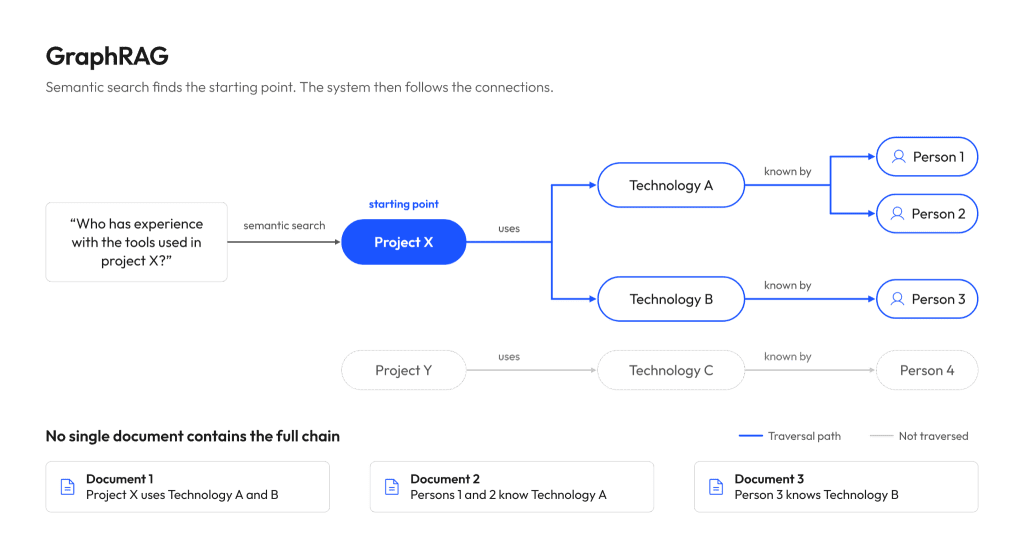
A similar problem appears when the most important information lies in how things are connected. Semantic search looks at each fragment separately, but information is often spread across documents and linked together: a person works on a project, the project uses a certain technology, and that technology is described somewhere else. Ask “Who has experience with the tools used in project X?” and no single fragment contains the answer. This is the idea behind GraphRAG: besides the documents, the system keeps a record of the things they mention (people, projects, technologies) and how they relate to each other. Semantic search finds a starting point, and the system then follows the connections to gather everything related. This makes it possible to answer questions that require combining several facts, though building and maintaining such a record is costly, so it pays off mainly when relationships are central to what users ask.
Retrieval Becomes a Tool
In every approach we’ve discussed so far, one thing stayed the same: retrieval was a fixed step that happened before the model started answering. A question comes in, the system searches, the results are added to the prompt, and only then does the LLM get to work. The model might help rephrase the query or write some SQL, but it never decides whether to search, where to search, or when it has found enough. Those decisions are hardcoded into the pipeline.
This works as long as the system is simple. But once there are several data sources, each searched in its own way, and users ask about very different things, a fixed pipeline starts to get in the way. Some questions don’t need any retrieval at all, yet the system searches anyway and fills the model’s context with irrelevant fragments. Others need data from a source the pipeline wasn’t set up to query for that kind of question. Writing rules for every possible case quickly becomes impossible.
The solution came from a capability that modern LLMs have gained along the way: tool use. A model can be given a set of tools, each with a short description of what it does, and during a conversation it can decide to use any of them, look at the result, and continue from there. From this perspective, every retrieval method becomes just another tool. Searching the knowledge base, querying a database, looking through Slack messages, or fetching data from an external system: each gets its own tool, and the model chooses which one fits the question. It also decides what exactly to search for, so the query is no longer limited to what the user typed.
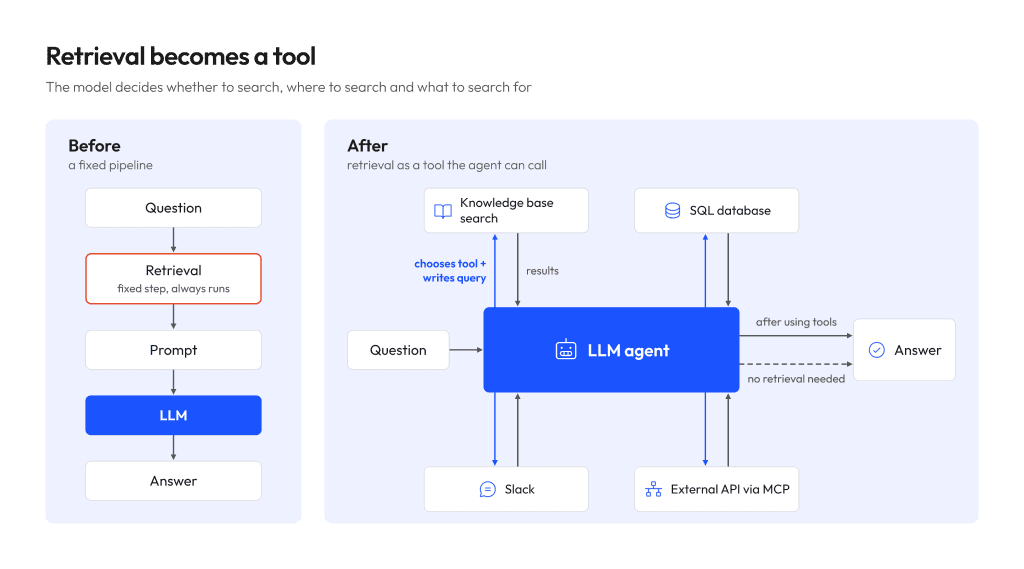
This changes more than it might seem. Retrieval stops being something that happens to the model and becomes something the model does. The system no longer needs to copy every data source into one vector database, because tools can search each source directly, in whatever way suits it best, and always return up-to-date data. Connecting new sources has become much easier too: thanks to standards like the Model Context Protocol (MCP), many services now offer ready-made tools that an LLM can use out of the box. And when a question doesn’t require any external knowledge, the model simply doesn’t search, keeping its context clean.
This is the point where retrieval becomes truly agentic. The LLM is no longer a component in a pipeline designed by someone else. It’s the one deciding how to gather the information it needs. And once a model can decide to search, nothing stops it from looking at the results and deciding to search again.
Iterative Retrieval
Once retrieval is a tool, searching more than once comes almost for free. In a classic pipeline, the model gets whatever the single search returns, and if something important is missing, it has no way to ask for more. Often it doesn’t even admit the gap and simply fills it with a plausible-sounding guess. An agent works differently: after each search, it looks at what it found and decides whether that’s enough to answer the question. If not, it searches again, rephrasing the query, digging deeper into a lead from the previous results, or turning to a different source altogether. It stops only when it judges that it has what it needs. This isn’t a separate technique so much as the natural way agents use tools, but it’s what makes their answers far more reliable: the decision about when retrieval is complete now belongs to the model, not to a fixed number of search steps set in advance.
Specialist Retrieval Agents
Iterative retrieval has a cost that’s easy to miss: everything the agent finds stays in its context. Every search result, every tool response, every dead end it explored along the way. With one or two searches this isn’t a problem. But when the question is complex and the agent has to dig through several sources, its context quickly fills up with material that was useful for a moment and then becomes noise. And the more cluttered the context, the harder it is for the model to focus on what matters, so the quality of the final answer starts to drop.
The solution is to split the work. Instead of having the main agent do all the searching itself, it delegates the task to a separate agent, a subagent, dedicated to retrieval. The main agent describes what it needs to know, the subagent goes off and searches, as many times and in as many ways as it takes, and then reports back with only the key findings. All the intermediate steps stay in the subagent’s context and never reach the main agent, which receives a short, focused summary instead of a pile of raw results.
This also opens the door to specialization. A subagent can be tailored to a single data source: equipped with only the tools that source requires and with instructions on how to search it effectively. This is especially useful for complex external systems that come with dozens of tools of their own, where finding the right information can take many steps. The main agent doesn’t need to know any of these details. It just asks the specialist. And when a question touches several sources, several specialists can work on it at the same time.
Of course, this comes at a price. Each subagent is an additional model call, which adds cost and time, and summarizing always carries the risk that something important gets left out. That’s why subagents make the most sense where retrieval is genuinely demanding, not as a default for every search.
SensAI Architecture Walkthrough
So far we’ve stayed fairly general, so let’s see how these ideas work in a real system.SensAI is deepsense.ai’s internal AI assistant, built with Ragbits, our open-source framework for building GenAI applications. Our people use it to ask about the company: who is available for a new project, who knows a given technology, how an internal process works, where a deal stands. They can ask in a web chat or by tagging SensAI in Slack, and engineers can connect it to tools like Claude Code or Cursor through MCP.
The chat itself was never the hard part. The hard part is that the answers are spread across many systems. Project and staffing data lives in Notion, company processes in the dOS Handbook (our internal knowledge base), skills and certifications in our Skill Matrix app, sales data in HubSpot, and everyday discussion in Slack, with Google Drive, the internal wiki, calendars and email on top of that. Each system stores data in its own shape, changes at its own pace, and has its own rules about who can see what.
Built the classic way, SensAI would start by copying all of this into one vector database. We took a different route. SensAI has one main agent equipped with a set of tools, and each source is reached in the way that suits it: SQL for structured data, search for documents, live API calls for data that changes by the minute. The main agent calls most of these tools directly, and one source is handled by a specialist subagent. Vector search is still part of the system, but only where it’s the right tool for the job.
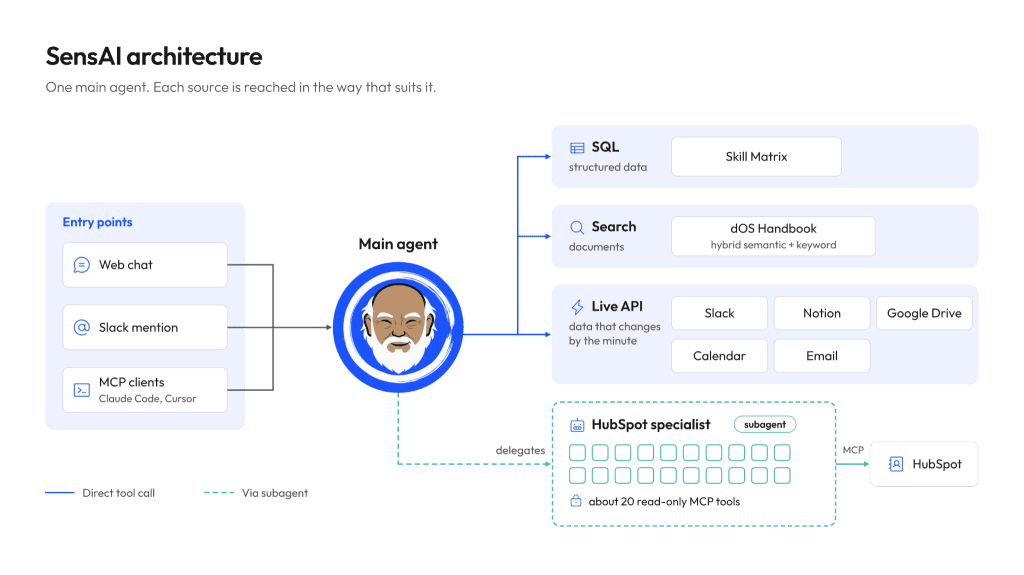
One rule shaped every integration: SensAI should see only what the person asking can see. Wherever a source supports it, the tools act on behalf of the signed-in user, with that user’s own permissions, rather than through a shared account that can see everything. Where a source doesn’t support that, the tool itself is available only to roles allowed to see the data.
In the rest of this section, we’ll walk through four sources. Each one pushed us toward a different idea from the first part of this article: the Skill Matrix toward structured retrieval, the dOS Handbook toward retrieval as a tool, Slack toward iterative retrieval over live data, and HubSpot toward a specialist subagent. For each, we’ll start with the problem and then show how we solved it.
Skill Matrix
The Skill Matrix is our internal tool for keeping track of who knows what. For every employee, it stores their skills and how well they know them, along with certifications and past projects. Whenever we staff a new project or look for an expert, this is where we turn, which makes it an obvious source for SensAI.
It’s also a textbook example of the problem we described earlier: it’s a table, not a collection of documents. Cut into chunks, the matrix loses what makes it useful: the structure tying each rating to a person and a skill. And even a clever embedding wouldn’t help with most questions. “How many people in the company know Kubernetes?” requires filtering and counting every row, while semantic search would return a few similar-looking fragments and leave the model to guess the rest.
There was one more complication: this is data about people, and not everyone is allowed to see everything. Depending on their role, someone may see only their own skills, their team’s, or the whole company’s, and SensAI had to respect those rules in every answer.
So instead of trying to fit the Skill Matrix into a vector database, we let the model query it directly with SQL. It first checks how the data is organized, then writes a query, and the database does the filtering and counting. The answer is based on exact numbers rather than on whatever fragments happened to be retrieved.
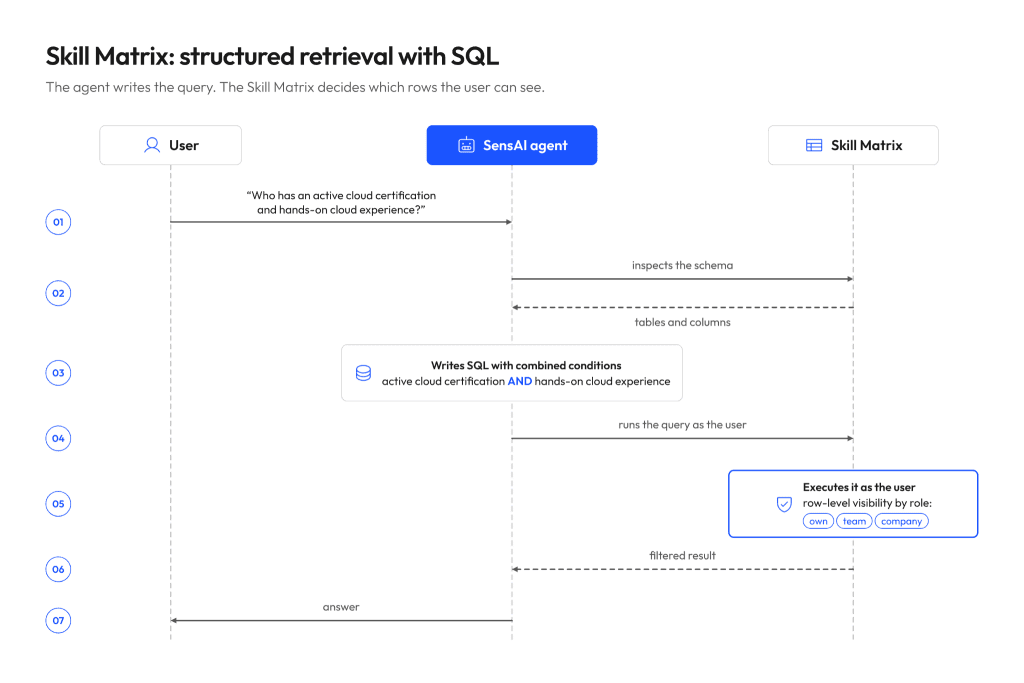
The real advantage is flexibility. People don’t ask the Skill Matrix a fixed set of questions. One wants to know who has a given skill. Another wants someone with an active cloud certification and hands-on cloud experience. A third asks which skills are most common in their team. An earlier version of the integration offered a few fixed tools for typical lookups, and it kept falling short whenever a question didn’t match one of them. With SQL, the model writes the query that fits the question in front of it, combining conditions however the question requires.
Access control, in turn, is handled where it belongs: at the source. Every query runs on behalf of the person asking, and the Skill Matrix itself decides which rows they can see, just as it does when they open the app. The model can write any query it wants and still never reach data the user couldn’t see anyway. And because SensAI keeps no copy of the data, every answer reflects the Skill Matrix as it is right now.
Notice that there’s no specialist subagent here. The workflow is simple enough that the main agent handles it well on its own, and a subagent would only add another model call. As we’ll see with HubSpot, that’s not always the case.
If you’re interested in how GenAI can make company expertise easier to find in other settings, take a look at this case study.
dOS Handbook
The dOS Handbook is our internal knowledge base describing how deepsense.ai works: our processes for delivery, pre-sales and recruitment, who is responsible for what, and the standards we follow. This is exactly the kind of content classic RAG was made for: well-written prose, where the answer to “How do we run a project kickoff?” sits in a passage that looks a lot like the question.
The problem isn’t the handbook but everything else SensAI is asked about. Someone checks who is on the bench, someone else asks how many people know Kubernetes, and a third person wants a summary of yesterday’s discussion on Slack. None of these needs the handbook, yet a classic pipeline would search it for every single question and add whatever came back to the model’s context. And since a similarity search always returns something, the model ends up reading about our recruitment process while trying to work out project staffing. With one data source, that’s a minor cost. With many, retrieval that runs on every question means noise in almost every answer.
At the same time, when the handbook does matter, it often matters a lot. A question about preparing a proposal may need both the pre-sales process and who owns each of its steps. Drafting a client document may depend on our brand guidelines even if the user never mentions them. A single search using the user’s exact words would easily miss part of that.
That’s why in SensAI the handbook is a tool, not a pipeline step. The tool’s description tells the agent what the handbook covers and what it doesn’t, so the agent searches it only when a question calls for it. When it does, it also decides what to search for: it can split a broad question into a few focused searches or rephrase a query that didn’t return anything useful. The query transformations we described earlier haven’t disappeared: the agent now does them itself.
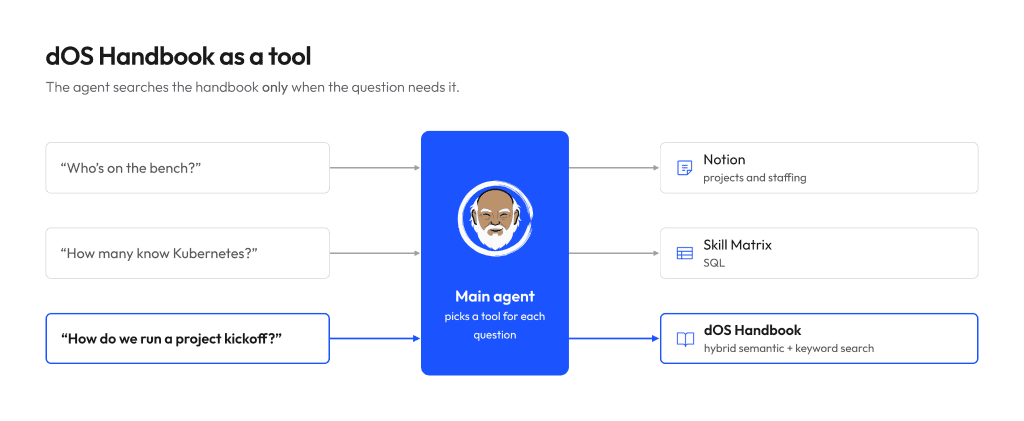
Under the hood, the search is still the classic kind, combining semantic search with keyword matching. What changed is who’s in charge: the decision about when to retrieve and what to look for has moved from the pipeline to the model. The model also gets whole pages rather than isolated chunks, along with who owns each page and whether it’s still a draft. That lets it point the user to the right person and warn them when a process isn’t final yet.
Of course, autonomy works both ways: an agent can also decide not to search when it should have. That makes the tool’s description surprisingly important. Describing a source well has become as important as searching it well.
Slack
A lot of what happens at a company never makes it into documentation. Decisions are made in threads, updates are posted in channels, and the answer to many questions is “it was discussed on Slack last week.” For SensAI, that means many answers can only be found there, and Slack turns out to be a poor fit for classic RAG.
The first problem is that Slack never stands still. New messages appear every minute, old ones get edited or deleted, and people often ask about the most recent ones: “What did the team decide this morning?” A vector database is a snapshot of the moment it was last updated. Keeping it current would mean re-indexing constantly, and it would still lag behind.
The second problem is that the meaning of a Slack message rarely lives in the message itself. “Sounds good, let’s go with the second option” is useless on its own: it only makes sense as a reply in a thread, under a question someone asked in a particular channel. Chunking breaks those connections. Index single messages and you lose the context; group them by time and you mix unrelated conversations. Many questions don’t fit similarity search anyway. “Summarize what happened in the project channel last week” isn’t about finding a similar passage, but about reading everything posted in one place over a period of time.
So instead of copying Slack into a vector database, we gave the agent tools to work with it the way a person does. It can search messages when it doesn’t know where something was said, read a channel over a chosen period, open a thread when a message has replies, or follow a link someone pasted. Each step builds on the previous one: a search turns up a message, the agent sees that it started a long thread, and it opens the thread to find out how the discussion ended. Every result comes straight from Slack, so it’s always up to date.
Working with Slack directly also solves a problem we haven’t mentioned yet. A lot of Slack lives in private channels and direct messages, and a central index would have to reproduce Slack’s access rules for every user. Our tools act on behalf of the person asking, through their own Slack account. SensAI sees exactly what that person can see, private conversations included, and nothing more.
The trade-off is that the agent relies on Slack’s own search, which matches keywords rather than meaning. That’s where it’s judgement comes in: if the first search comes back empty, it tries different words, another channel or a different time range, just as a person would.
HubSpot
HubSpot is the CRM where our sales and marketing teams keep track of deals, clients and contacts, along with every email, call and meeting logged along the way. Typical questions include “Which deals did we lose last quarter, and why?”, “How many inbound leads came in this month?” or “What was our last conversation with this client about?”
Copying this data into a vector database would cause problems at every step. Most of it is structured: each deal, company or contact is a record with hundreds of fields, so we’d run into the same issue as with the Skill Matrix. It changes all the time, as deals move through the pipeline and new activities get logged. Much of its meaning lies in connections: a deal belongs to a company, involves specific contacts and has a history of emails and meetings attached to it. And it’s a third-party system, so we’d be maintaining a sync for data whose structure we don’t control.
HubSpot does provide an official MCP server, so the agent can query the CRM directly. But that only solves half the problem. The server comes with around twenty tools, each doing one narrow thing: search records, list related records, read an email or a note. A single question often takes a whole chain of calls. To find out why we lost deals last quarter, the agent has to search for lost deals, look up the companies behind them, read the notes attached to each one, and count the results itself, because the server can’t aggregate. Every intermediate result stays in the agent’s context. Our HubSpot also has its own quirks: which of the hundreds of fields actually matter, how we mark a deal as won or lost, what counts as an inbound lead. The agent needs to know them to query the CRM correctly, but they’re useless for any other question.
This is where a specialist subagent makes sense. Instead of giving the main agent all the HubSpot tools, we gave it just one: a HubSpot specialist it can ask a question. The specialist has the HubSpot tools and instructions describing our setup. It does all the searching and counting in its own context and returns a short summary. The main agent never sees the raw records, and the HubSpot know-how only comes into play when a question actually needs it. We also gave the specialist only the tools that read data, so it can’t change anything in our CRM.
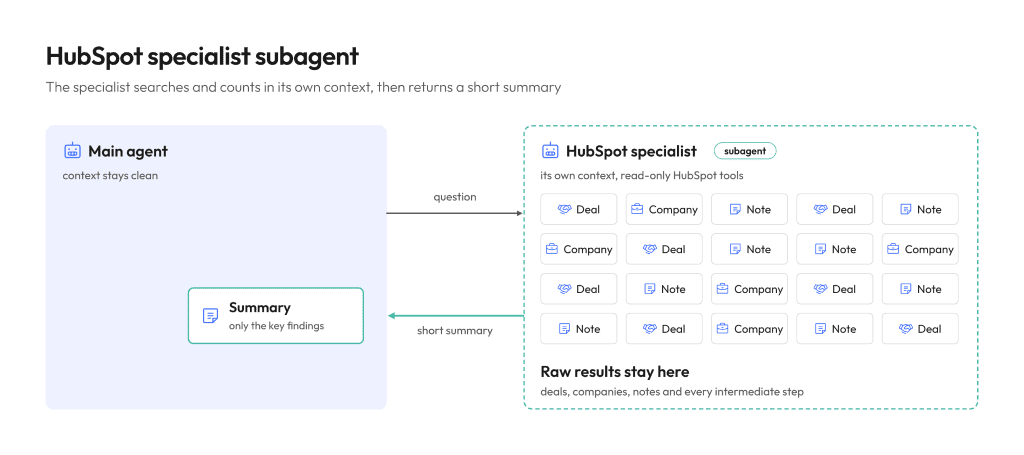
Compare this with the Skill Matrix. There, the source let the agent ask complex questions directly and described its own data, so a subagent would only have added an extra model call. HubSpot’s interface is generic, takes many steps and isn’t ours to change. The knowledge of how to use it has to live somewhere, and a subagent is a natural place for it. That costs an extra model call and some risk of losing details in the summary, which is why we use a subagent here and not for the Skill Matrix.
When Agentic RAG is wrong answer
After four examples of replacing pipelines with agents, it would be easy to conclude that agentic retrieval is simply the better approach. It isn’t always. Giving the model control over retrieval has real costs, and in some situations they outweigh the benefits.
The first is speed and cost. A classic RAG pipeline needs one search and one model call. An agent might make several tool calls, each requiring another round trip to the model, and a complex question can take tens of seconds to answer. For an internal assistant, where the alternative is digging through Notion and Slack by hand, that’s a good deal. For a search box on a website or a support bot handling thousands of simple questions a day, it usually isn’t.
Agentic retrieval also pays off mainly when there’s a real choice to make. Its value comes from deciding where to look, what to look for and when to stop. If all your data is one collection of documents, say product documentation, and almost every question needs it, the agent will search it every time anyway. A fixed pipeline does the same with fewer moving parts. We described exactly this kind of setup in a case study on a RAG-powered tech support chatbot, where a classic pipeline turns technical manuals into fast, accurate answers. The dOS Handbook benefited from being a tool precisely because it’s one source among many.
Then there’s predictability. A pipeline does the same steps for every question, which makes it easy to test, debug and audit. An agent can take a different path each time, and sometimes it skips a search it should have made. Evaluating it means looking at the whole sequence of decisions, not just whether the right document was retrieved. In settings where you have to show exactly what the system looked at and why, a fixed process is much easier to defend.
Agentic retrieval also depends on the model. Choosing tools, judging whether results are complete and knowing when to search again are skills that have improved a lot in recent model generations. If you’re limited to a small or older model, for cost reasons or because it has to run on your own infrastructure, those decisions become less reliable, and a well-tuned pipeline may give better results.
Finally, sometimes the best retrieval is none at all. When the knowledge is small enough to fit in the context window, it’s simpler to include all of it in every prompt. SensAI does exactly that with the description of its own data sources: the agent doesn’t search for it, it simply receives it with every question.
[Important] Production Evaluation Checklist
None of this means going back to where we started. In practice, the answer is often a mix: fixed retrieval where a source is always needed, and tools where the agent has to choose. The point is to make that choice deliberately, source by source, rather than by default.
Create your production evaluation checklist and make some right choices.
Summing Up
Classic RAG hasn’t disappeared. It has become one tool among many, alongside SQL queries, knowledge graphs, live API access and specialist subagents, each suited to a different kind of data.
The biggest shift is that the model now decides when to search, where to look, what to search for and when it has found enough, which is what made it possible for SensAI to work across Notion, Slack, HubSpot and the Skill Matrix without copying everything into a single vector database. Agentic retrieval isn’t a default to apply everywhere, though, so the best systems choose source by source between fixed pipelines and agent-driven tools, weighing flexibility against cost, speed and predictability.

Start Your Agentic Journey
Switch from Classic Rag and explore new opportunieties.