Table of contents
Code is cheap. Human time and model context are not. That is the core shift behind Harness Engineering: instead of trying to write better prompts, teams getting more reliable value from coding agents increasingly design better systems around their agents – documentation, context loading, validation, and feedback loops that let models safely own more of the work.
Table of contents
Earlier this year, our team won an OpenAI Codex hackathon with HyperCode, a repository intelligence layer that prepares relevant context for coding agents before they start working. Building it gave us a concrete way to explore how the system around an agent shapes its work. For engineering leaders, the goal is more predictable delivery: less time spent reconstructing context and fixing avoidable agent mistakes, with consistent checks before changes reach review.
We also tested harness patterns in our own setups with Codex and Claude Code, bringing together people from across deepsense.ai with different backgrounds, workflows, and levels of experience with AI‑assisted development. We explored agent‑readable repo docs, just‑in‑time context, validation loops, and ways to turn recurring mistakes into durable guardrails. Some patterns proved useful. Others needed adjustment. This post brings together those findings and the practical recommendations that emerged.
This article is our practical playbook: ten harness patterns you can apply to a real repo this week. We focus on three concrete layers: how your repo becomes an agent‑readable knowledge base, how context is compiled just‑in‑time for each task, and how validation and feedback turn agent mistakes into durable system improvements.
TL;DR:
- Make the repo the knowledge base: use a short
AGENTS.md, linked docs, and tests that explain why. - Load context just in time: assemble relevant files, tests, history, and past decisions for each task.
- Start with durable tools: prefer familiar commands and a few focused, task-relevant skills.
- Make validation discoverable: provide a fast command menu shared by humans, agents, and CI.
- Close the feedback loop: let agents validate, observe, and fix—with explicit retry limits.
- Use visual feedback selectively: start with text; use targeted screenshots when pixels matter.
- Prompt for intent: explain the desired outcome and decision process; reserve rigid rules for true invariants.
- Keep planning proportional: use short plans and low-risk experiments; add detail when mistakes are expensive.
- Turn mistakes into guardrails: capture friction at checkpoints and promote recurring issues into docs, tests, or linters.
- Build for model changes: keep the workflow and validation contract stable as models and tools evolve.
What we mean by “harness”
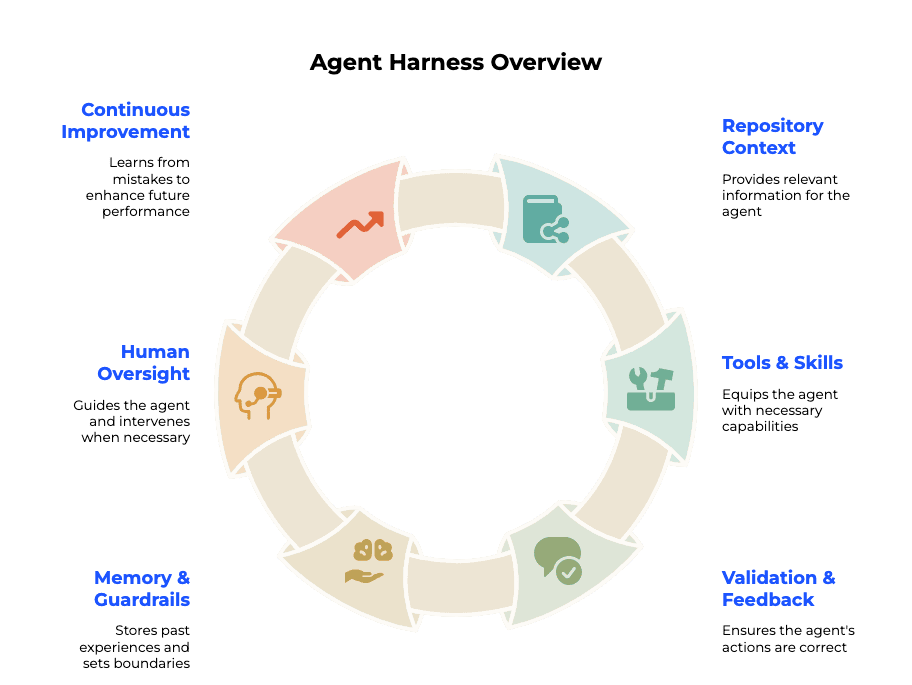
In this post, harness means everything built around the model: the repo structure, AGENTS.md and specs, tools and skills, sidecars and hooks, validation menus, observability, and the “garbage collectors” that keep the system from decaying. Humans steer objectives and design the harness. Agents execute inside it.
A harness is the system around the model that lets it work on your codebase. It supplies context, runs tools, and feeds results back so the agent can decide what to do next. Repo docs, skills, hooks, tests, and browser automation all contribute to that system.
Take a bug fix: the agent reads the relevant code, makes a change, runs a test, inspects the failure, and tries again. The harness makes that loop possible and sets its limits. Humans define the goal and constraints; agents work inside them.
1. Repo as knowledge base – document the why, not just the what (AGENTS.md)
Your coding assistant can read your code. What it cannot infer on its own is why the code is structured the way it is, what tradeoffs were made, which abstractions are intentional, and which parts are legacy landmines.
The fix is to give agents access to the engineering knowledge your team already relies on. Start with an AGENTS.md file at the repo root, so the assistant can work from the same assumptions and constraints as the people maintaining the code.
What goes into AGENTS.md
Think of it as the document you would hand a strong contractor or staff‑level engineer on day one – but written for a model that “craves text” about your architecture, rules, and scars. It should cover:
- Architecture overview – main modules, their responsibilities, and how they interact
- Key constraints – “never bypass the auth middleware,” “all DB writes go through the repository layer”
- Conventions – naming patterns, file structure, preferred libraries
- Entry points – where to start reading for common task types
- Out-of-bounds areas – parts of the codebase the agent should not touch without explicit instruction
Use AGENTS.md as a table of contents for the codebase: a stable map the agent can orient itself with before starting any task. It does not need to contain every detail. Instead, point to deeper docs in docs/ and domain‑specific READMEs, so the model can progressively discover more context when it needs it.
Without this, the agent either invents assumptions or wastes context trying to infer structure from file trees.
Minimal AGENTS.md skeleton
# AGENTS.md

## What this repo is
[One paragraph: product purpose, main user flows, tech stack.]

## Architecture
- `src/api/` - HTTP layer, no business logic here
- `src/services/` - all domain logic lives here
- `src/db/` - repository pattern, direct DB access only here

## Key constraints
- Auth is handled by `AuthMiddleware` - do not bypass or replicate it
- All external API calls go through `src/clients/` with retry logic

## Conventions
- Commit messages: `type(scope): what changed - WHY it changed`
- New endpoints need an integration test in `tests/api/`
- Feature flags via `FeatureFlag` enum in `src/config/flags.py`

## Where to start
- Adding a feature: read `docs/architecture/feature-checklist.md`
- Fixing a bug: run `make test-unit` first, reproduce before changing anything
- Touching infra: tag @platform-team for review

## Do not touch without asking
- `src/legacy/billing/` - scheduled for migration, fragile
- `infra/terraform/prod/` - requires human approval
Keep this file short enough to load at the start of each task, and update it when the architecture or working conventions change.
The commit message as the “why” store
AGENTS.md covers structure. But the deeper why – reasoning behind individual decisions – lives best in commit history and test docstrings. Both are already in the repo, versioned, and readable by the agent with a simple git log or grep.
Good commit message discipline is not new advice – explaining why in the body, not just what in the subject, has been a best practice for years. The diff shows what changed; the message captures the reasoning that will never be visible from the code alone – the constraints, the tradeoffs, the alternatives you rejected.
What changes now is who drafts them. As more of your diffs are generated by Codex or Claude Code, the agent can write the commit message too – including the why – if you instruct it to follow your template. Humans still own the final check: skim for correctness and nuance, especially on risky changes, and feed recurring corrections back into AGENTS.md so the next commit comes out better.
## Commit message convention

When committing, always include a body explaining:
- Why this change was made
- What problem it solves or risk it removes
- Any tradeoffs or constraints that shaped the approach

Format:
type(scope): short summary of what changed

Reasoning here - what was the previous behavior, why was it a
problem, and what should a future engineer know before touching this.

Closes #<issue>
With this in place, every agent-generated commit becomes a documentation artifact – a durable explanation of why the model produced it that way, readable by the next agent that picks up a related task.
Regression tests as living rationale
A test docstring is one of the best places to record why a guard exists – especially for invariants that have already bitten you in production. Keep this for real incidents and non‑obvious constraints so tests stay readable.
def test_token_validated_before_db_lookup():
    """
    Regression: tokens must be validated before any DB call.
    See commit a3f9c12 - DB-first validation caused race conditions
    under load and unnecessary read pressure. This test ensures
    expiry check stays upstream of the repository call.
    """
    ...
Now the agent does not just know that the test exists – it knows what it is protecting and why removing it would be a mistake. When something breaks in production, fixing the bug and adding a regression test with a clear docstring is one of the highest‑leverage harness moves you can make.
Checklist
AGENTS.mdexists at repo root with architecture overview and constraints.AGENTS.mdis short and high‑signal, and links to deeper docs indocs/ or domain READMEs instead of duplicating them- Commit messages include a “why” body, not just a “what” subject line
- Agent is instructed to write commit bodies explaining reasoning
- Critical regression tests have a docstring explaining what they guard
AGENTS.mdhas an “out-of-bounds” section for fragile or off-limits areasAGENTS.mdis updated when the architecture changes (treat it like a README)AGENTS.mdtells the agent how to verify its work (which tests or commands to run, how to interpret failures)- When incidents happen, fixes are encoded back into the harness: update
AGENTS.md, add regression tests, or tighten linters – not just “better prompts”
2. Just-in-time context over RAG (the sidecar)
The standard instinct when wiring up a coding assistant is to reach for embeddings: chunk the codebase, build a vector index, retrieve the top-k results at query time. It feels principled. In practice, for a living codebase, it tends to fail quietly – the retrieved chunks are stale, semantically similar but task-irrelevant, or missing the one file that actually matters for this diff.
For a codebase under active development, we recommend just‑in‑time (JIT) context: assemble the context a task needs right before the agent starts working, using the current repository, git history, and harness rules. A repo-wide embedding index can help with discovery, but generic similarity search can miss dependencies, recent decisions, or constraints that matter for a specific change. Task-aware context assembly brings those pieces together.
Why JIT beats broad retrieval for coding tasks
| Broad RAG | JIT context | |
| When context is chosen | At index-build time, before the task exists | Inside the loop, once the task is known |
| How relevance is decided | Cosine distance to the query | Task-aware: call graph, paths, recent commits, a sidecar/agent |
| Freshness | As fresh as the last re-index | Read from the live repo, every time |
| Token cost | Often over-fetches | Lean – only what the agent needs |
| Best fit | Static corpora: docs, API refs, legal/tax text | Living codebases under active change |
JIT context does not mean “no embeddings ever”. Many sidecars still use embeddings under the hood – but as one signal among others (file paths, symbols, call graphs, recent commits), and always scoped to the current task. The key differences are who decides relevance (a task‑aware sidecar vs a generic index) and when context is assembled (just before work vs once for the entire repo).
For static, stable corpora such as legal docs, tax interpretations, or API reference manuals, semantic search can still be useful and can be combined with JIT context as a hybrid. Choose the context strategy around the material: use semantic retrieval where it helps, and task-aware assembly where freshness and dependencies matter.
The sidecar pattern
The idea is simple: before the coding agent starts a task, a lightweight sidecar process (a script, a smaller agent, or a skill) prepares the context package. The coding agent never has to figure out what to load – it arrives with exactly what it needs.
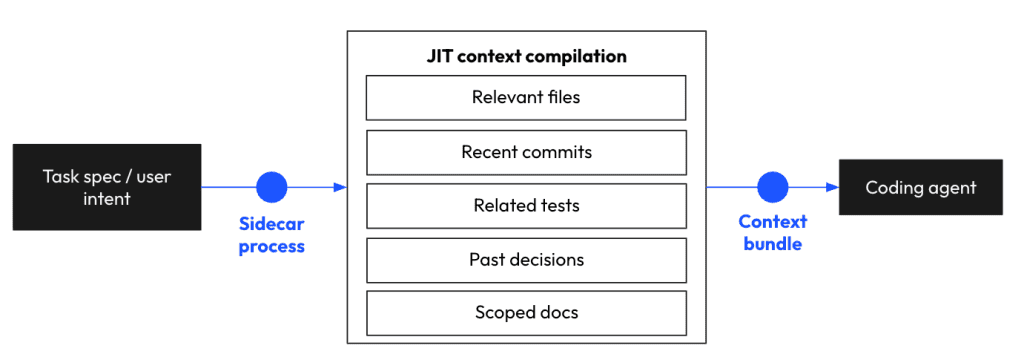
The sidecar does not need to be complex to start. A script using git log, rg, and a few path rules can already outperform a generic embedding lookup for many tasks: grab recently changed files, match feature keywords, pull related tests, and respect AGENTS.md out‑of‑bounds rules.
A real example: HyperCode
During the OpenAI Global Codex Hackathon in San Francisco, our team built HyperCode – a repository intelligence layer that puts this sidecar idea into practice. The core problem it solves: standard Codex sessions waste time in grep-based search loops – searching, reading, refining, repeating – and still regularly miss relevant files or cross-cutting dependencies.
HyperCode sits between the repository and the agent. It builds a hypergraph from three sources:
- Structural links between files (symbols, imports, call graphs) – to surface cross‑cutting dependencies that naive RAG misses
- Semantic summaries and feature labels over clusters of changes – to compress related files into single “concept nodes”
- Codex session memory – decisions made in previous sessions that should influence the current one (rejected approaches, chosen patterns, tech‑debt markers)
A single natural‑language query against this graph surfaces ranked, context‑aware file groups before execution starts. In our hackathon benchmarks against vanilla Codex sessions, HyperCode cut time from feature prompt to implementation plan by over 50%, reduced token usage, and stopped the agent from missing files that were not statically linked but were semantically affected by the change.
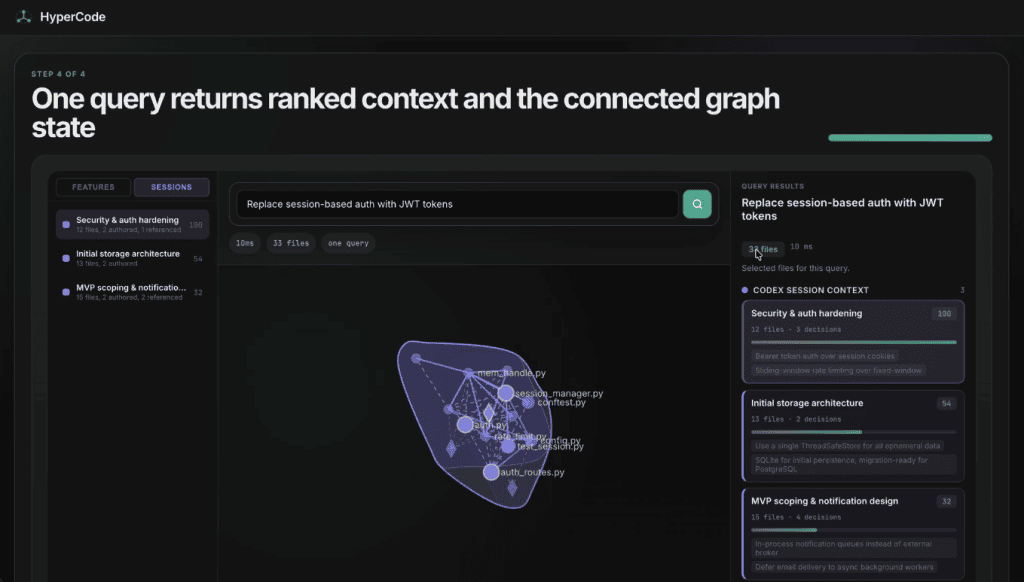
HyperCode query interface – a single query returns 33 ranked files across primary, support, and affected categories in 10ms, alongside relevant Codex session decisions.
We built HyperCode as a Codex plugin with hooks, so it was invoked automatically before the agent even started planning a feature. No manual trigger, no extra prompt. The context was just there, ready, before the first line of reasoning began. This is the key distinction from a tool the agent calls reactively mid‑session: the sidecar fires before intent becomes execution, as part of the harness pre‑work.
The bigger lesson applies beyond HyperCode: Coding‑agent session memory – decisions, tradeoffs, rejected approaches – is valuable context that normally disappears when the window closes. Capturing it in a hypergraph, a memory store, or even just structured logs, then feeding it back into future sessions, is one of the highest‑leverage harness upgrades you can make.
Checklist
- Context is compiled just-in-time per task – not fetched from a static embedding index
- Sidecar or hook fires automatically before agent planning starts (not reactively mid-session)
- Context includes: relevant files, recent commits, related tests, scoped docs
- Past Coding Agent session decisions are captured and fed back as context for future tasks
- For larger specs: subtasks each get their own lean context bundle
3. Durable tools and focused skills
Coding assistants benefit from a clear starting point: the tools your team already uses, guidance for unfamiliar commands, and a few skills for workflows that need more structure. Start with search, git history, tests, linters, and small repo scripts. Document the parts an agent would otherwise have to guess. When the same mistakes keep recurring, turn that guidance into a focused skill. This gives the harness a practical progression: familiar tools, explicit references, then reusable workflows.
Start with familiar tools
Common development tools are useful harness primitives because coding assistants usually know their syntax and can inspect their output directly. Commands such as rg, git log, and git diff expose the repository’s current structure and history without requiring a separate integration.
Put a short list of preferred tools in AGENTS.md:
- Use `rg` to find existing implementations before adding an abstraction.
- Use `git log --oneline -- <file>` to investigate surprising code.
- Use `git diff` before summarizing or committing changes.
- Use the repository's test and lint targets to validate edits.
Keep the instructions specific to decisions that matter in your repo. If the assistant already uses a command correctly, a tutorial adds little. The useful guidance is where to start, which project conventions to follow, and what evidence to inspect before changing code.
These defaults also travel well across assistants and editors. A repository’s history, command output, and tests remain useful even when the model or agent interface changes.
Document unfamiliar commands
An internal CLI or custom script needs more explanation. Its name may suggest what it does while hiding important details: required flags, working directory, generated files, or prerequisites.
Give the agent a compact reference covering purpose, when to use it, a safe example, and how to inspect help. For a migration helper, that might look like this:
Use scripts/create_migration.py when a change needs a database migration.
It generates migration files using this repository's naming conventions.

Example: python scripts/create_migration.py --name add_user_timezone
Help:    python scripts/create_migration.py --help

Inspect the generated migration before applying it.
If generation fails, report the error before choosing another approach.
The reference should answer the questions an agent would otherwise resolve through trial and error. If a command requires a particular environment or produces an artifact that needs review, say so. Keep longer explanations in a linked tool reference.
Help output gives the assistant a way to recover when its assumptions are wrong. Teach it to inspect that output before inventing another flag or repeating a failed invocation. A small, maintained reference is often enough; start there before adding a more elaborate workflow.
Turn recurring failures into skills
Sometimes the command is straightforward, but the surrounding workflow keeps going wrong. The assistant may skip a prerequisite, run steps in the wrong order, misread the result, or mark work complete before validating it. That is a useful trigger for a skill.
A skill should explain the sequence, the decisions between steps, and the completion criteria. For the migration helper, a focused workflow could be:
- Inspect the schema change and nearby migrations.
- Generate the migration with the repository helper.
- Review the generated operations and rollback behavior.
- Run the relevant migration checks in the documented test environment.
- Report what changed, what passed, and anything unresolved.
Add recovery guidance where experience shows it is needed. If generation fails, inspect the error and help output. If validation exposes an ambiguous data conversion, surface that decision before proceeding.
Build the skill around a recurring task with recognizable failure modes. Its value comes from carrying the workflow knowledge that a command reference alone cannot supply.
Keep skills focused and task-relevant
The size of your skill library and the number of skills needed for a task are separate decisions. You can maintain guidance for many workflows while loading only the few relevant to the current change.
SkillsBench offers a useful signal. In its reported task groups, one skill improved performance by 18.0 percentage points, two to three by 19.0 points, and four or more by 10.1 points. Its length comparison also showed larger gains for compact and standard guidance than for comprehensive documentation. These comparisons support a practical starting point: a small set of focused skills. They do not establish a universal limit for every repository or task.
Make each skill’s description precise enough for the agent to select it: what it handles, when to invoke it, and which neighboring tasks belong elsewhere. Avoid several skills giving slightly different instructions for the same responsibility. When you already know the right skill, invoke it explicitly.
Keep SKILL.md centered on the steps and decisions needed to execute the workflow. Link to extended examples and background material so they can be read when relevant. As you revise skills, remove obsolete workarounds and repeated instructions. Otherwise, the guidance accumulates the same ambiguity it was meant to resolve.
Checklist
- Name the repository’s preferred tools and explain where each helps.
- Document unfamiliar commands with their purpose, prerequisites, examples, and help path.
- Promote recurring workflow mistakes into a focused skill with validation and recovery steps.
- Load skills according to the current task; keep their responsibilities distinct.
- Review guidance when tools or conventions change, pruning duplication and obsolete instructions.
4. A discoverable validation menu
An agent can only improve its own work if it can check the result. Give it a discoverable menu of validation commands, tell it to prefer that menu, and connect the commands to the checks your team actually relies on. Keep the command definitions in the repository’s existing task runner. The examples below use a Makefile, but the same approach works with other runners: one place to discover what to run and how.
Name checks by intent
Name tasks after the outcome the assistant needs: lint, test-unit, test-integration, or check. These names make it easier to match a validation goal to a command and let you change the underlying tool without rewriting agent instructions.
The target also records the correct invocation, including details that are easy to miss when reconstructing it from the environment:
.PHONY: lint test-unit check

# CI: static-analysis
lint:  ## Run the project's lint checks
	uv run ruff check .

# CI: unit-tests
test-unit:  ## Run unit tests
	PYTHONPATH=. uv run pytest tests/unit

check: lint test-unit  ## Run lint and unit tests
Adapt the recipes to your project. Environment setup, paths, exclusions, and flags belong here, where humans and CI can use them too.
Choose descriptions that explain scope. A target called test is ambiguous if it runs only unit tests; its description should make that clear. Likewise, distinguish checks that modify files from checks that only inspect them. The assistant needs enough information to choose an appropriate target and interpret its result.
Make the menu easy to discover
A command registry only helps if the assistant can find the right entry quickly. For Make, provide a help target that prints target names and their descriptions. Generate that output from the ## comments beside each target, so the menu stays attached to the command definitions.
The result should be short and useful:
lint              Run the project's lint checks
test-unit         Run unit tests
test-integration  Run integration tests
check             Run lint and unit tests
Other runners provide similar discovery through their task-listing commands. Use the mechanism your team already maintains.
Include prerequisites in the descriptions or link to a short setup reference when needed. An integration target that requires a running database should make that dependency discoverable. This reduces failed attempts caused by missing setup and helps the agent distinguish an environment problem from a regression.
Tell the agent to prefer the menu
In our testing, a discovery pointer alone was insufficient. An assistant told to inspect the Makefile used its targets for tests, then constructed its own ruff command for linting. It detected uv and assembled a plausible invocation, but missed details encoded in the repository target.
The lesson was simple: discovering a command and choosing to use it are separate behaviors. State the preference explicitly in AGENTS.md or CLAUDE.md:
Discover validation commands with `make help`.
Prefer an existing Make target when it matches the check you need.
Before invoking a tool directly, look for a matching target.

When no target fits, such as for a single test file, inspect the closest
target and keep your command consistent with its environment and flags.

Validate during implementation and run the required completion checks
before reporting the task finished.
This instruction gives the assistant a decision procedure without duplicating the command menu. The fallback matters: a targeted test can be useful during debugging even if the registry exposes only a broader suite. If the same custom invocation becomes routine, add a parameterized target so the next session can discover it.
Share the validation contract with CI
Have CI invoke the same targets developers and agents use locally. Document which targets belong to each stage, as the comments in the example above do, and keep that mapping current when the pipeline changes. This reduces differences between the checks an agent runs and those that gate a merge.
Give the workflow a cost ladder. During implementation, run the cheapest checks that confirm a change works: a targeted test, lint, or a relevant unit suite. Before completion, run the broader required checks. Make dependencies and ordering explicit where one stage needs another’s output.
Fast checks encourage validation throughout the task. Use parallel execution where the suite supports it, avoid repeatedly performing unchanged setup, and keep targeted checks available. Optimize the command definitions once so every caller benefits.
Commands must also fail clearly. A check that prints errors but exits successfully can mislead both the agent and CI. Return a non-zero exit status on failure and provide readable output. Ask the agent to report the checks it ran, their results, and anything it could not validate. Those observations feed the bounded feedback loop in the next section.
Checklist
- Keep validation commands in one maintained registry with names and descriptions that explain their scope.
- Provide a cheap discovery command and document prerequisites.
- Tell the agent to prefer matching targets, with a fallback for targeted checks.
- Reuse targets in CI and keep the stage mapping current.
- Offer fast checks during implementation and broader checks before completion.
- Make failures observable through exit status, readable output, and reported results.
5. Close the loop on text-observable systems
A coding agent is only as good as the feedback it can observe.
It can generate code, but unless it can also run something, read the result, and decide what to do next, it is basically working blind. This is why one of the most useful harness patterns is a small self-feedback loop: let the agent make a change, validate it through tests, CLI output, API responses, or code review, then loop once or twice on the observed result.
The important part is not “agent autonomy” for its own sake. The important part is giving the agent access to ground truth.
For software tasks, that ground truth usually comes from things like:
- Unit tests
- Integration tests
- Type checks
- Linters
- Security scanners
- API smoke tests
- CLI command output
- Structured code review output
Without this loop, the agent may produce plausible-looking code that does not compile, violates project conventions, breaks an edge case, or introduces a security issue. With the loop, the agent can see that something is wrong and attempt a fix before handing work back to a human.
Agent writes code
     ↓
Run validation command
     ↓
Observe text output
     ↓
Fix or report
     ↓
Stop after retry cap
A minimal convention for this is:
validate → observe → report
The agent should not just run a command. It should explain what it ran, what it observed, what it changed because of that observation, and whether the result is now good enough to proceed.
Why limit caps matter
Self-feedback loops are useful, but unbounded loops are dangerous.
An agent that keeps trying to fix failing tests forever can burn time, pollute the diff, and drift away from the original task. The harness should make it explicit that the agent gets a limited number of attempts, and after that it must escalate to a human.
Example: Bounded review/fix loop
A useful self-feedback loop does not have to be complicated. The cleanest version is:
orchestrator → reviewer → fixer → reviewer → fixer → ... → stop
The key idea is that the orchestrator owns the loop. It does not review code itself and it does not fix code itself. It delegates the noisy work to focused subagents and keeps only loop state in its own context – so the agent can improve its own work, but it cannot run forever.
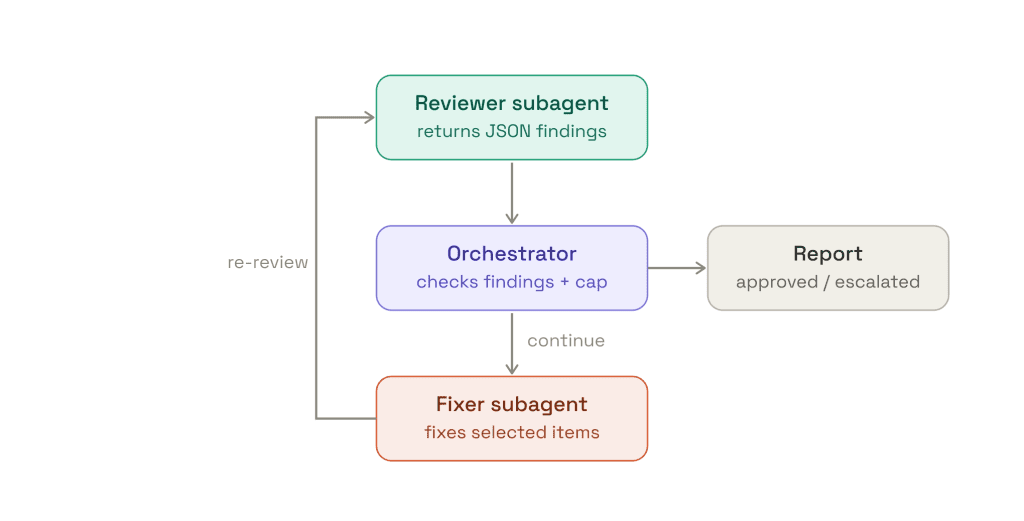
This is the part that keeps the main context clean. The orchestrator should never ingest verbose review essays, raw logs, or every detail of the fixing process. The reviewer hands back compact findings; the fixer hands back a compact change summary. Everything else stays inside the subagent that produced it.
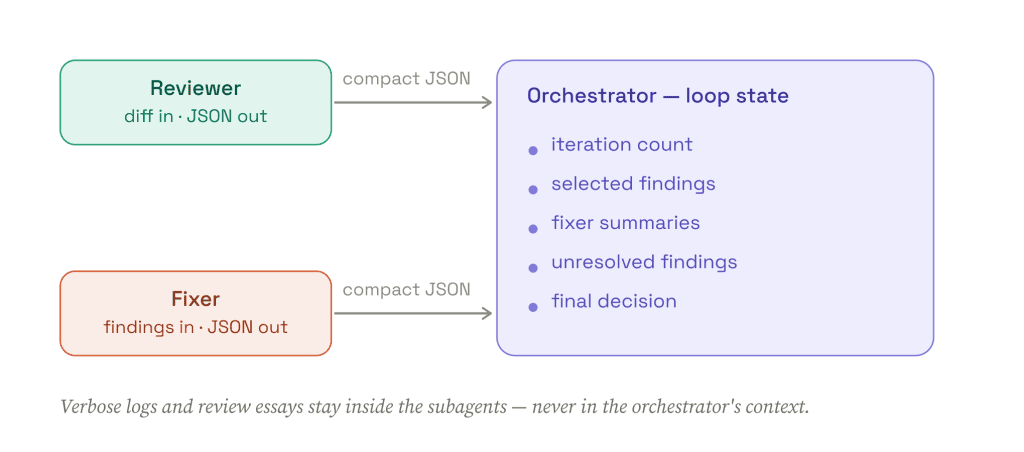
The orchestrator’s context holds loop state only. That is what keeps a long loop cheap and debuggable.
The orchestrator
The only place retry state lives
Reviewer and fixer subagents never decide whether to keep looping – they do one job and return structured output. The orchestrator increments the iteration count and stops when the cap is reached. Its skill definition opens with a clear role statement so it doesn’t “helpfully” start reviewing or fixing code itself, and disables model invocation so it’s only ever run deliberately.
review-looper/SKILL.md – frontmatter
---
name: review-looper
description: Run a bounded review/fix loop for the current branch. Orchestrates a reviewer subagent and a fixer subagent, tracking iteration count and enforcing a max-iteration cap before approving or escalating to a human.
disable-model-invocation: true
---
The retry cap is explicit and lives in orchestrator context – this is the safety rail. Max review iterations is 3. The decision logic is: approve when the reviewer returns no high or critical findings; escalate once the iteration count reaches the cap, copying anything unresolved into the handoff; otherwise select the findings worth acting on and pass them to the fixer. The loop state is kept in context and printed at the start and end of every iteration so the progression stays visible:
loop state – printed each iteration
{
  "review_iteration": 0,
  "max_review_iterations": 3,
  "status": "in_progress",
  "unresolved_findings": []
The Reviewer subagent
Read-only, structured findings
The reviewer observes the diff and returns compact findings. It never edits files, commits, or writes a long review essay – its tools are limited to Bash, Read, Grep, and Glob. Crucially, it returns only JSON, so the orchestrator gets data it can route to the fixer rather than prose it has to reinterpret.
reviewer – output
{

  "summary": "<1-2 sentence overview of the diff>",

  "findings": [

    {

      "id": "F1",

      "severity": "critical | high | medium | low",

      "file": "path/to/file.ext",

      "line": 123,

      "category": "correctness | security | design | tests",

      "title": "<short headline>",

      "detail": "<what is wrong and why it matters>",

      "suggested_fix": "<concrete, targeted change>"

    }

  ]

}
The Fixer subagent
Scoped to selected findings
The fixer doesn’t receive the whole task – only the findings the orchestrator selected, which keeps changes targeted and scoped. It adds Edit and Write to the reviewer’s toolset, applies the changes, and reports what it could not address so those items carry forward as candidates for the unresolved list. Like the reviewer, it returns only JSON.
fixer – output
{

  "summary": "<1-2 sentence overview of what changed>",

  "changes": [

    {

      "finding_id": "F1",

      "status": "fixed | partial | skipped",

      "files_changed": ["path/to/file.ext"],

      "description": "<what changed and how it resolves it>",

      "reason_if_skipped": "<required when skipped or partial>"

    }

  ]

}
Why this pattern is useful
The self-feedback loop is bounded.
The agent can review, fix, and re-review, but only up to the max iteration count.
{

 "review_iteration": 2,

 "max_review_iterations": 3,

 "status": "in_progress"

}
The main loop stays clean.
Reviewer and fixer subagents return structured data, not verbose output. The orchestrator only stores:
– current iteration
– selected findings
– fixer summaries
– unresolved findings
– final decision
The failure mode is useful.
When the loop cannot resolve something, it stops with a human-readable handoff.
## Review loop result

Status: escalated

Review iterations used: 3/3

Unresolved findings:
- F4, high, security, `src/auth/token_service.py:42`
 Token refresh behavior needs a product/security decision.

Fixed during loop:
- F1: normalized expiry timestamps to UTC
- F2: added missing regression test for expired tokens

Why stopped:
Max review iteration count reached.
That is the core harness move: let the agent observe its own side effects, but make the loop structured, delegated, and capped.
6. Visual feedback for UI work
For many frontend tasks, the agent does not need screenshots. It can usually validate behavior through cheaper, text-observable signals:
– tests
– DOM text
– accessibility snapshots
– console output
– network output
– route changes
Use those first. They are cheaper, easier to diff, and usually more reliable than asking the model to judge a full screenshot.
But some UI failures are inherently visual: broken spacing, clipped content, overflow, wrong stacking order, responsive layout bugs, chart rendering, canvas state, contrast, or “this technically works but looks wrong.” That is where visual feedback becomes part of the harness.
The rule of thumb:
Prefer text.

Use screenshots when pixels are the requirement.
A simple visual feedback ladder
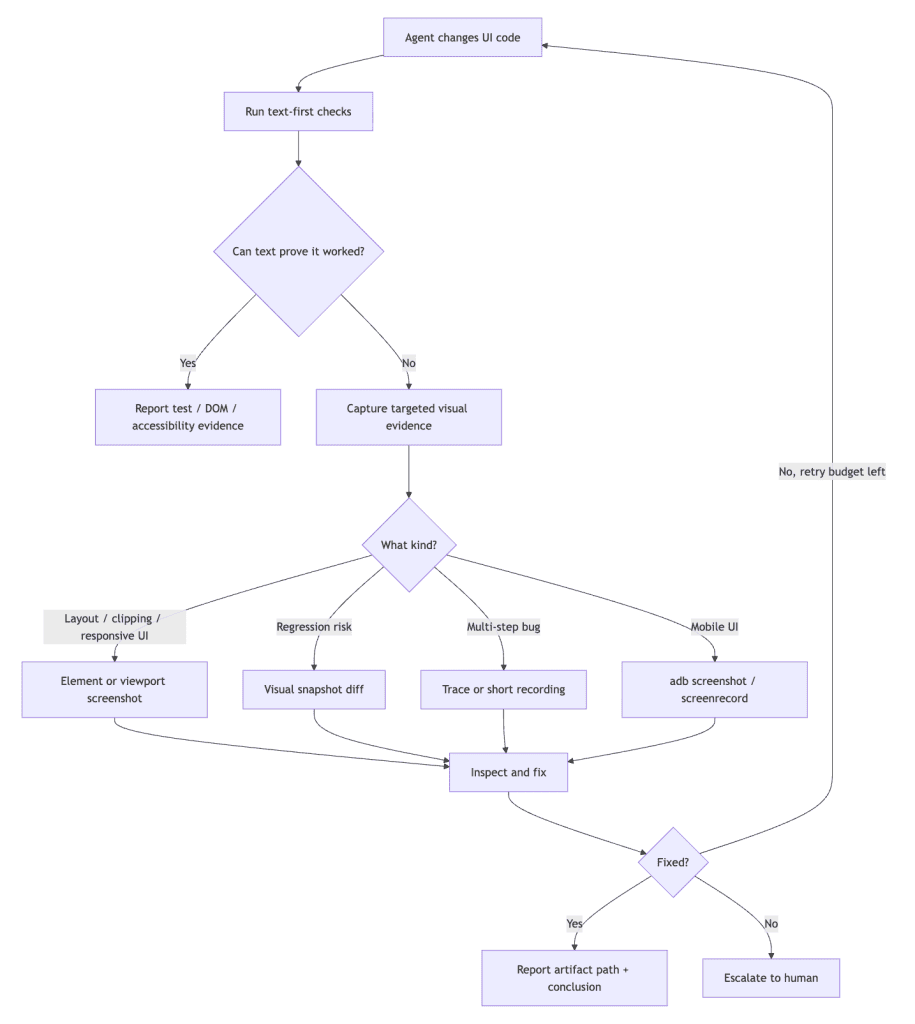
Browser UI: Playwright first
For browser apps, Playwright gives you a good escalation path:
# Text-first validation
npx playwright test tests/ui/example.spec.ts --project=chromium

# Visual regression check
npx playwright test tests/ui/example.visual.spec.ts --project=chromium

# Debug a multi-step flow
npx playwright test tests/ui/example.spec.ts --project=chromium --trace on
npx playwright test tests/ui/example.spec.ts –project=chromium –trace on
Use Playwright tests / CLI when the check should become repeatable. Use Playwright MCP when the agent needs to explore the UI interactively.
A minimal visual regression test:
import { test, expect } from '@playwright/test';

test('settings panel does not visually regress', async ({ page }) => {
  await page.goto('/settings');

  await expect(page.getByRole('main')).toHaveScreenshot(
    'settings-panel.png',
    { maxDiffPixels: 100 }
  );
});
Keep screenshots narrow. Prefer an element, component, dialog, or viewport state over a full-page screenshot. Full-page screenshots are useful, but they are often too noisy for an agent loop.
Mobile UI: an adb screenshot loop
For mobile UI, pixels often matter earlier: native layout, keyboards, gestures, system bars, density, and device-specific rendering can be hard to infer from text output.
A tiny Android screenshot helper is enough:
#!/usr/bin/env bash
set -euo pipefail

OUT_DIR="${1:-artifacts/mobile-ui}"
mkdir -p "$OUT_DIR"

STAMP="$(date +%Y%m%d-%H%M%S)"
OUT="$OUT_DIR/screen-$STAMP.png"

adb exec-out screencap -p > "$OUT"

echo "$OUT"
For flows that need motion:
adb shell screenrecord /sdcard/ui-check.mp4
adb pull /sdcard/ui-check.mp4 artifacts/mobile-ui/ui-check.mp4
adb shell rm /sdcard/ui-check.mp4
Do not ask the agent “does this look good?” Ask a narrow visual question:
Inspect the screenshot and answer only:

- Is the primary CTA visible above the fold?

- Is any content clipped or overlapping?

- Is the keyboard covering the input?

- Is the price text readable?
Add this to AGENTS.md
## UI validation

Use the cheapest evidence that can prove the UI change worked.

1. Prefer tests, DOM text, accessibility snapshots, console output, and network output.
2. Use screenshots only for layout, clipping, responsive behavior, charts/canvas, visual regressions, or design fidelity.
3. Prefer element/component screenshots over full-page screenshots.
4. Use traces or short recordings for multi-step failures.
5. For mobile UI, use `adb exec-out screencap -p` or `screenrecord`.
6. When visual evidence is used, report the artifact path and what it proved.
7. Do not make more than 2 screenshot-driven fix attempts without escalating.
What did not work
Screenshots are useful, but they are token-hungry and easy to overuse.
We also tried compressing screenshots more aggressively, including blue-noise-style dithering. It did not reliably help. It made images smaller, but model judgment got worse on the details that mattered: small text, subtle spacing, and low-contrast UI.
The better compression strategy was boring:
- crop to the relevant component
- prefer element screenshots
- ask one specific visual question
- avoid full-page screenshots unless necessary
- cap screenshot-driven retries
Checklist
- Start with text-observable validation.
- Use screenshots only when the task depends on pixels.
- Prefer targeted screenshots over full-page screenshots.
- Use visual diffs for regression risk.
- Use traces or recordings for multi-step failures.
- Use adb screenshots for mobile UI.
- Cap screenshot-driven retries.
- Promote repeated visual bugs into tests, visual snapshots, or harness rules.
7. Old Prompts Backfire on New Models
A prompt is calibrated to a specific model. Upgrade the model, keep the prompt, and the calibration is gone – usually in the direction of over-compliance, not under-compliance.
The important part is not that the new model is worse at following instructions. It is better at following them – including the parts you never really meant.
The incident
A rule written for an older coding agent, as a cheap insurance policy against sloppy pushes:
NEVER push a PR unless the local build is green.
Then the model got upgraded, but so the result of your prompt. Same prompt, two models:
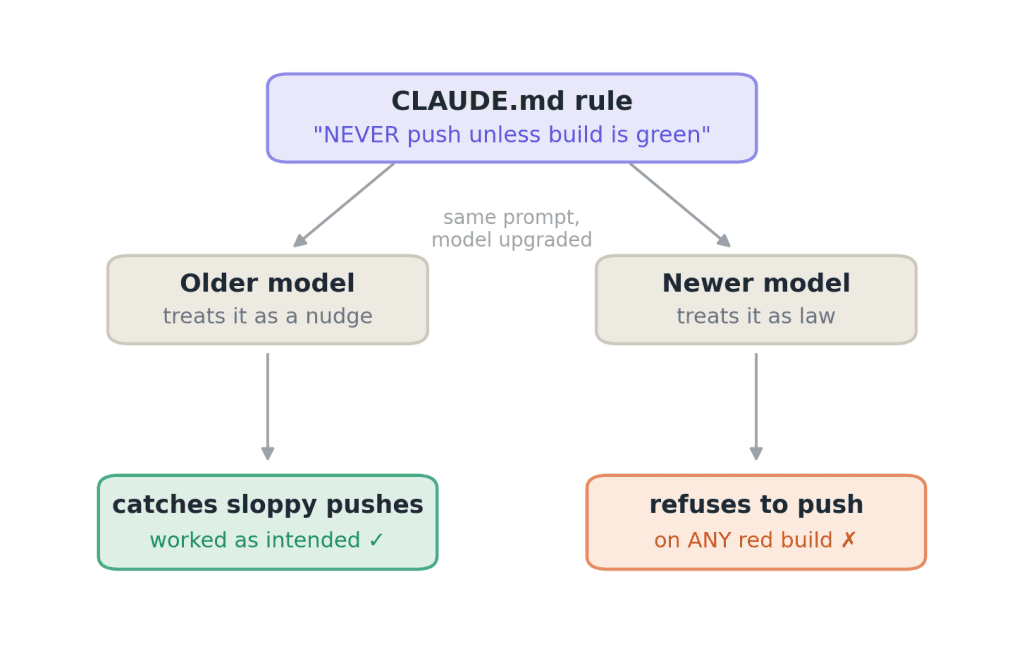
The rule encoded a proxy (“green build”), not the intent (“don’t ship broken changes”). A better model optimizes the proxy harder:
| Local failure | Your fault? | Correct action | Rigid rule does |
|---|---|---|---|
| Test also red on main | No | Push, note it | Block ✗ |
| Known flaky test | No | Push, note it | Block ✗ |
| Unrelated package fails, yours untouched | No | Push, note the scope | Block ✗ |
| Your code breaks a test | Yes | Fix first | Block ✓ |
Why rigid rules backfire
A NEVER/ALWAYS rule is a pre-decision. You decided the outcome of every future situation before seeing any of them – and silently assumed the model would apply “reasonable” judgment on top.
Newer models increasingly read NEVER as “zero judgment, you said never.” Which produces this loop:
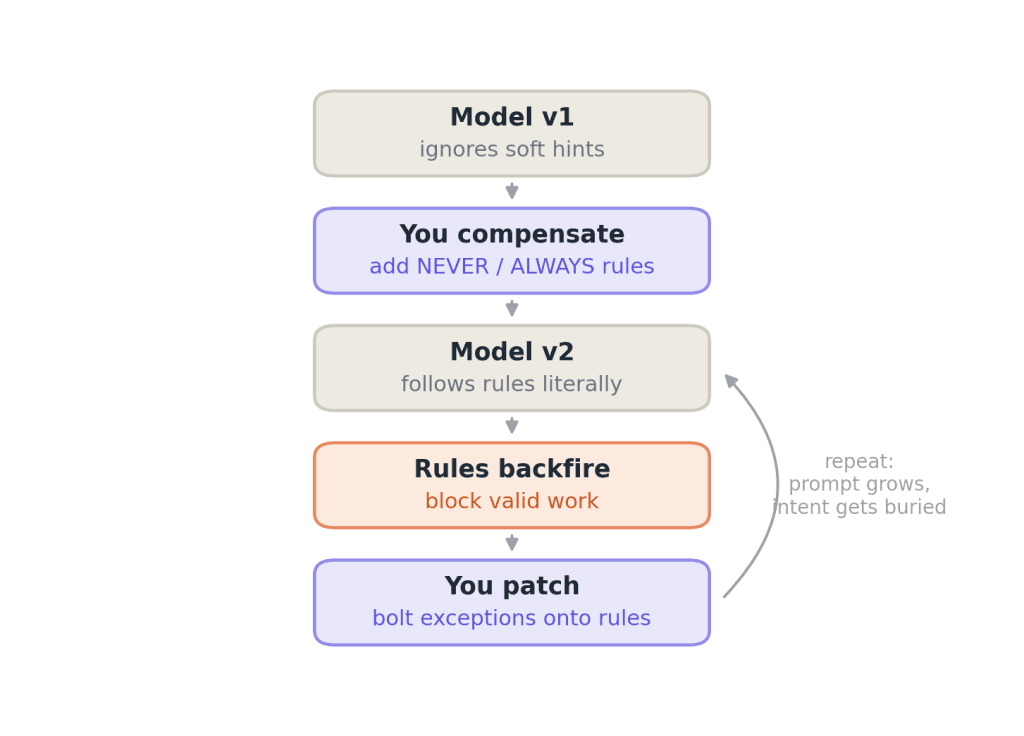
- The rule outlives its reason. It was compensation for one model’s sloppiness; the sloppiness is gone, the rule remains.
- Negative rules carry no goal. The model knows what not to do, but has no basis for the neighboring cases you didn’t enumerate – so it defaults to refusing.
The fix: intent + decision procedure + escape hatch
Rewrite prohibitions into three parts: the outcome you actually care about, how to decide at runtime, and what to do when unsure.
rewrite 1 – the build gate
– NEVER push a PR unless the local build is green.
+ Don’t ship changes you have reason to believe are broken.
+ Run the build; if it fails, check whether YOUR change caused it.
+ Pre-existing or flaky failure -> say so and proceed.
+ Can’t tell -> stop and ask.
rewrite 2 – dependency paranoia
– NEVER add new dependencies.
+ Prefer stdlib and existing deps. If a new dep clearly wins,
+ propose it with a one-line justification.
rewrite 3 – clarification gating
– ALWAYS ask for clarification before writing code.
+ Ask only when ambiguity changes the design. Otherwise state
+ your assumption in one line and proceed.
The transformation is always the same:
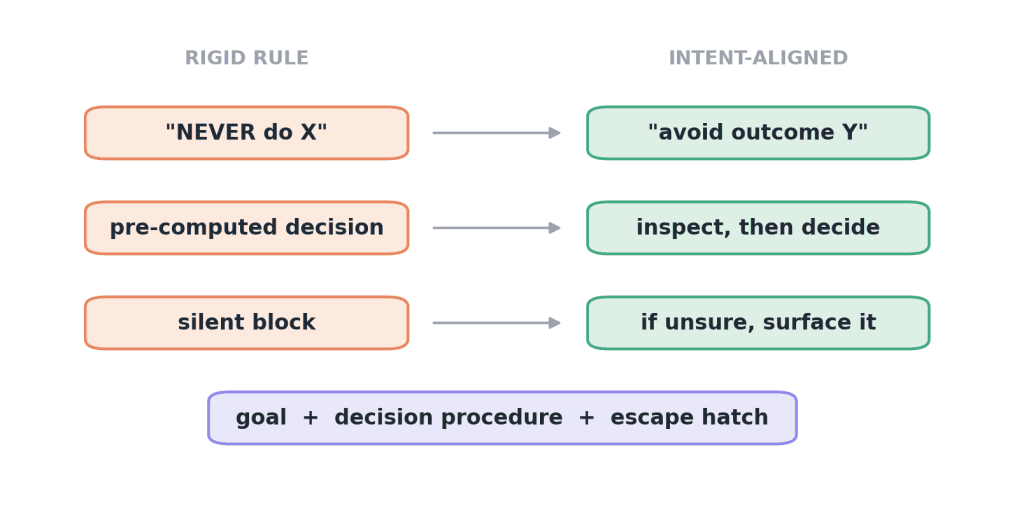
Reserve literal NEVER/ALWAYS for true invariants – secrets, destructive ops, prod access. Not workflow preferences.
That is the core move: stop pre-computing decisions in the prompt, state the outcome you care about, and let the model decide with real context in front of it – bounded by “surface it if unsure.”
8. Plan-mode pitfalls (and when to just YOLO)
Plan mode feels safe: the assistant reads the repo, writes a plan, you approve it, and implementation begins. The trap is that approval is not neutral. In many coding assistants, accepting a plan behaves like an agent handoff: the implementation agent receives the plan text as a high-priority instruction, while much of the exploratory context that produced it is gone. If the plan is incomplete, over-specific, or based on a wrong assumption, you did not reduce risk – you promoted the mistake into the task contract.
We saw this while experimenting with Superpowers-style planning skills. The workflow was useful for forcing discussion, but for regular coding work it became too verbose: long brainstorming, long design docs, long implementation plans, and a lot of paid model time spent producing text nobody wanted to read. In the worst cases, it felt like money spent on nothing: the assistant produced polished planning artifacts, but the final diff was not better.
Other users report the same failure mode. In a Hacker News discussion, one user said Superpowers-like frameworks burned roughly 10× more tokens with no clear benefit for their workflow, while another described the design document being expanded into a second implementation document and then delegated to subagents even for trivial changes. A Reddit thread about Superpowers planning describes slow plan generation, drained limits, and implementation plans that consume far more tokens than expected.
That does not mean Superpowers skills are useless. The pieces people seem to like are narrower: brainstorming for fuzzy requirements, test-driven-development and systematic-debugging for disciplined implementation, and verification-before-completion / code-review skills for final checks. Borrow those opt-in when the task needs discipline, not as a default tax on every edit.
This is not a blanket argument against planning. Some users like Superpowers because the plan sketch and editable markdown docs make big tasks easier to review than Claude Code’s built-in plan mode. The pitfall is using heavyweight planning by default. For many coding tasks, the better loop is to start with a lightweight prompt, let the assistant explore, inspect the diff, then keep it or throw the attempt away with a clean reset.
That failed run is still useful. It tells you what context was missing. Did the assistant misunderstand the user journey? Add a short design note. Did it touch the wrong subsystem? Add an AGENTS.md pointer. Did it skip validation? Add a Make target or checklist. For low-risk tasks, a short implementation attempt can reveal gaps that a long planning discussion leaves hidden. Use what the attempt exposes to improve the harness before trying again.
Use heavier planning only when wrong work is expensive: cross-cutting migrations, security-sensitive changes, ambiguous product work, or tasks that need multiple agents. Even then, keep the plan short and force it to name assumptions, open questions, files likely to change, and validation commands – not every implementation step.
Checklist
- Prefer a short plan sketch over a multi-page implementation plan.
- Treat accepting a plan as accepting instructions, not just approving intent.
- Keep plans editable in the repo when they are longer than a screen.
- Use cheap throwaway runs for low-risk exploration.
- Invoke narrow skills deliberately: debugging, verification, TDD, worktrees, or context grilling – not the whole workflow by default.
- When a run fails, promote the missing context into
AGENTS.md, a design note, a test, or a validation target. - Use heavy planning only when discarded implementation attempts would be more expensive than the planning itself.
9. The Agentic Garbage Collector – let the agent record its own mistakes
Every agent session generates friction that never makes it into the diff. The agent works around a confusing abstraction, makes a wrong assumption and recovers, notices a test that asserts the wrong thing, or gets corrected by a human. Today that signal evaporates when the context window closes, and the next agent rediscovers the same landmine. The Agentic Garbage Collector is a three-phase loop that stops the leak:
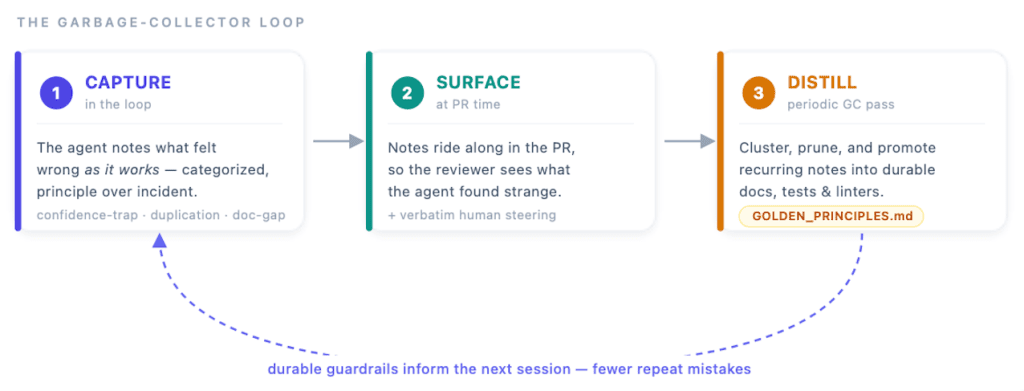
Capture
The agent needs a cheap, standing habit of jotting down what felt wrong while it works – into a scratchpad it appends to freely, or a notes file committed alongside the change so the signal stays attached to the exact diff. The bar to record has to be low enough that it never competes with the task, and a small taxonomy keeps the notes countable rather than free-form:
principle-violation   duplication      inconsistent-impl   stale-todo
brittle-test          missing-test     confidence-trap     doc-gap
human-correction      ...
Record the incident clearly, and add a candidate principle when the lesson is clear. A correction like “don’t parse that untyped payload here” might suggest a broader rule: “unknown external data is validated at the boundary before it enters business logic.” In our experiments, agents sometimes proposed rules that were too closely tied to the original correction to apply elsewhere. When the broader lesson is unclear, leave the principle blank; the distillation pass can revisit it alongside related incidents and human feedback. Keep capture focused on actionable friction, including existing problems that affected the task, and exclude unrelated baseline noise.
The hard part, in practice, is getting the agent to do this ambiently at all. We put the instruction in AGENTS.md and in a skill, and it still recorded nothing until asked at the end – then produced excellent notes, reconstructed from memory. Its own words:
“Fair catch – I should have been recording those ambiently as I hit them, not at the end.”
This is the same lesson as the prompting and validation sections: a passive “when you notice something, also do this” instruction loses to the primary objective. The fix is to make capture part of the harness, not a request – a stop-hook that asks “you changed code but logged nothing, did you hit anything weird?”, or folding the prompt into PR creation. Treat ambient self-reporting as unreliable and build a checkpoint that forces the question.
Surface
At PR time, the accumulated notes – plus any verbatim human steering from the session – get pulled into the PR summary, so a reviewer sees what the agent found strange while building this. Someone who reads “adding one knob needed four hand-synced sites” across three PRs in a row has the evidence to justify a refactor – evidence that otherwise never gets written down.
Distill
Capture without distillation just relocates the entropy: a notes file grows fast, and an unmanaged log soon becomes too long to read and a cost to carry. So a scheduled pass reads the notes together with PR comments and failed CI, clusters them, prunes what’s resolved, and promotes the recurring ones. The promotion rule is a bright line, not a judgment call:
The same mistake twice, or 2–3 human unblocks on the same theme → it becomes a rule, test, or check – not another note.
Recurring principles land in an append-only GOLDEN_PRINCIPLES.md (with an AGENTS.md pointer); repeatedly-broken behavior becomes a regression test with a why docstring; anything mechanically detectable becomes a linter rule. GOLDEN_PRINCIPLES.md is the memory-compiler output – the durable form of those distilled principles, promoted only once they’ve proven recurring.
One caution: in noisy, fast-moving environments, unguarded self-repair balloons context and tokens. If every oddity becomes a rule, the guidance set bloats and rules start to conflict (see the “how many skills” evidence earlier). Keep the durable layer general and stable, put case-specific fixes in a separate errata file, and require a human to ratify before an erratum becomes a general principle. The GC proposes; a person approves – which is also where an over-fit, too-narrow rule gets caught.
Checklist
- Agent records weirdness as it works, cheaply, against a small taxonomy so notes stay countable.
- Notes capture the underlying principle, not just the incident – and skip baseline noise the agent didn’t create.
- Capture is enforced by a harness checkpoint (stop-hook / PR gate), not an
AGENTS.mdline – ambient self-reporting is unreliable. - Notes are surfaced at PR time alongside verbatim human steering.
- The same mistake twice, or 2–3 human unblocks on the same theme → propose a rule, test, or check for human review.
- Durable output lands in
GOLDEN_PRINCIPLES.md, regression tests, or linters; case-specific fixes go in an errata file a human ratifies.
Summary
Getting more out of coding agents starts with giving them a better setup: useful repo docs, the right context, and quick ways to check their work. Keep skills focused, avoid overplanning small tasks, and let agents fix what they can—with limits on retries. When the same mistake keeps coming back, turn it into a test, a check, or clearer guidance.
Models and coding tools will keep changing. A good harness should make those changes easier to absorb by keeping the workflow, validation rules, and engineering standards stable.